Deployment Guide
Introduction
| Item | Content |
|---|---|
| Applicable Role | Pre-sales solution engineer, delivery owner, implementation engineer, customer architect |
| Navigation Path | Deployment > Deployment Guide |
| Function Description | Helps users select deployment mode, request resources, and plan networking, middleware, and compute node onboarding before installation |
This document answers "how should we deploy" rather than "which command should I run now". For a first read, follow the path below before entering the detailed installation documents.
Beginner Explanation
Use this document before touching the installer. It helps you decide the deployment shape first: PoC or production, single-node or multi-node, cloud-managed middleware or self-managed middleware, and which ports must be opened.
Reading Path
| Stage | What You Decide | Output |
|---|---|---|
| Step 1: Confirm deployment goal | PoC, public-cloud production, or private-cloud / IDC | Deployment mode is selected |
| Step 2: Confirm middleware approach | Use cloud-provider managed middleware or self-managed middleware deployed by the installer | managed-middleware, hybrid, or self-managed is selected |
| Step 3: Confirm resource sizing | Required machine count, CPU, memory, and disk | Resource request list is ready |
| Step 4: Confirm network and ports | How users, business nodes, middleware, and compute clusters communicate | Security group / firewall allowlist is ready |
| Step 5: Enter execution docs | Choose single-node, multi-node, or compute node installation docs based on the decision | Ready for precheck and installation |
Terminology Quick Reference
| Term | Plain Explanation |
|---|---|
| PoC | Proof-of-concept or demo environment focused on quickly validating functionality, not high availability |
| Production deployment | Deployment for formal business use, with high availability, backup, monitoring, permissions, and operations requirements |
| Management plane | Area where AGIOne control plane and business services run; users mainly access this part |
| Compute node onboarding | Connecting GPU / NPU nodes to the platform for training, inference, IDE, and similar workloads |
| Public-cloud managed middleware | Cloud-provider database, Redis, Nacos, Kafka, and object-storage services; formal delivery may use only the products and versions in this document's compatibility matrix |
| Compatibility baseline | A combination of cloud provider, product, version, and access mode that has passed installation, initialization, runtime, and cleanup regression |
| Private cloud / IDC | Customer-owned data center or private cloud environment, usually requiring more self-managed middleware |
| VPC | Cloud private network. Business nodes and middleware should usually be in the same VPC. |
| ELB / ALB | Load balancer entry that distributes user requests to multiple App / Edge nodes |
1. Overview
An AGIOne platform deployment is logically divided into two relatively independent parts:
- Management plane: Hosts the AGIOne control plane, business services, databases, and middleware, and serves as the entry point for users and the platform.
- Compute node onboarding: Integrates accelerator nodes such as GPU / NPU nodes into unified scheduling and hosts compute workloads such as training, inference, and IDE sessions.
The two parts communicate over the internal network. The management plane manages compute clusters and collects observability data through the Kubernetes API and monitoring interfaces.
2. Overall Architecture
The following diagram shows the overall logical architecture of the AGIOne platform, including the relationship between the user access entry point, the management plane, and the compute node onboarding layer.
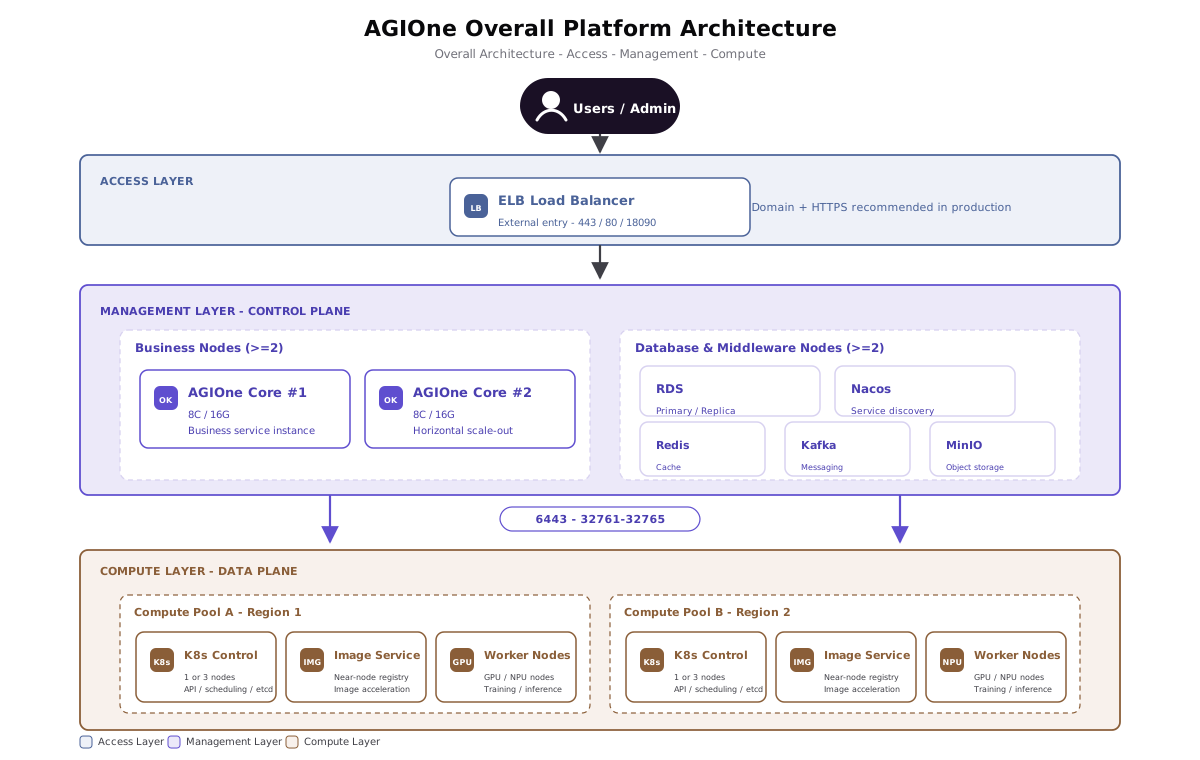
Architecture highlights:
- The access layer can expose management-plane services through a load-balancing service accepted for the project. In production, a domain name + HTTPS (443) is recommended.
- The management plane consists of at least 2 business nodes + 2 database/middleware nodes, and business nodes can scale horizontally.
- Compute clusters are deployed independently by regional compute pool. Each region deploys a near-node image service to improve image pull performance.
- The management plane schedules and accesses compute clusters through the Kubernetes API (6443) and extended ports (32761-32765).
3. Deployment Mode Selection
| Deployment Mode | Applicable Scenario | Nodes | High Availability | Recommended Environment |
|---|---|---|---|---|
| PoC Deployment (All in One) | Proof of concept, demo, internal testing | 1 | No | Single virtual machine |
| Production Deployment - Public Cloud | Formal production and external service delivery | Multi-node | Yes | Public cloud (Recommended) |
| Production Deployment - Private Cloud / IDC | Data compliance and internal network isolation | >= 4 | Yes | Customer-owned private cloud or IDC |
Selection recommendation: If there are no mandatory data compliance or network isolation requirements, prioritize public cloud deployment to benefit from cloud-provider managed middleware and operational convenience.
The current installer supports only the Alibaba Cloud and Huawei Cloud managed-middleware combinations that have completed verification. "Supported" applies only when the product, version, and access constraints in 5.1.2 Databases and Middleware all match; it does not cover every similar product offered by that provider.
| Cloud Provider | Support Status | Covered Managed Middleware | Applicable Installer Mode | Notes |
|---|---|---|---|---|
| Alibaba Cloud | Conditionally supported | ApsaraDB RDS for MariaDB, Tair / ApsaraDB for Redis, MSE Nacos, ApsaraMQ for Kafka, and OSS | managed-middleware / hybrid | Only the tested versions and access modes in 5.1.2 are supported. Confirm RAM permissions, service-linked roles, VPC connectivity, and allowlist policies before delivery. |
| Huawei Cloud | Conditionally supported | RDS for MariaDB, DCS for Redis, CSE Nacos, DMS for Kafka, and OBS | managed-middleware / hybrid | Only the tested versions and access modes in 5.1.2 are supported. App / Edge nodes must access managed middleware endpoints through private networking. |
| Other public clouds | Unsupported | Not verified | Not applicable | Tencent Cloud, AWS, Azure, Google Cloud, and other providers have not completed end-to-end compatibility testing with the current installer and must not be used for formal delivery. |
4. Management Plane - PoC Deployment (All in One)
4.1 Resource Requirements
| Item | Minimum Requirement |
|---|---|
| Number of nodes | 1 |
| CPU | >= 16 cores |
| Memory | >= 24 GB |
| Disk | >= 200 GB |
| Network | Internet access required |
| Operating system | Linux (Ubuntu 22.04 recommended) |
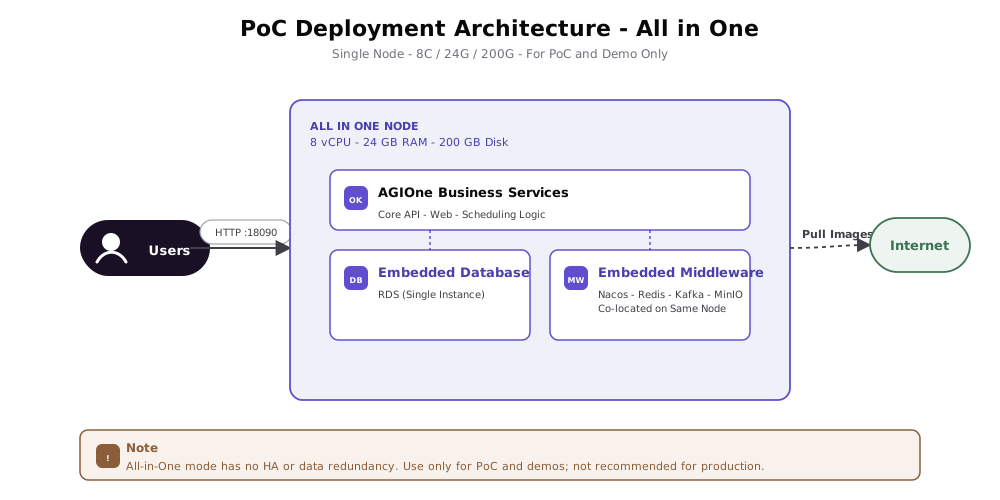
4.2 Architecture Diagram
| Item | Description |
|---|---|
| Scope | AGIOne full-stack deployment solution design, pre-sales support, PoC assessment, and production delivery |
| Constraint Level | This document is a planning reference. Official delivery is governed by the Release Note and compatibility matrix distributed with agione-release-v1.0-XXX.tar.gz. |
- Business services, databases, and middleware are all deployed on the same node.
- Services are exposed externally through HTTP port
18090by default. - Because images and dependencies need to be pulled, the deployment node must be able to access the Internet.
- Not recommended for production because it has no high availability or data redundancy.
5. Management Plane - Production Deployment (Public Cloud)
Public cloud is the recommended production deployment mode. It leverages cloud-provider managed database, cache, messaging, registry, and object-storage capabilities. Entry load balancing requires separate project acceptance.
5.1 Resource Requirements
5.1.1 Management Nodes (Business Nodes)
| Item | Requirement |
|---|---|
| Number of nodes | >= 2 |
| CPU | >= 8 vCPU |
| Memory | >= 16 GiB |
| Disk | >= 200 GiB |
| Private network | All management nodes are in the same VPC |
| Public network | Internet access available, bandwidth >= 100 Mbps |
Optional: Shared storage, such as block storage, of >= 1024 GB can be mounted for shared use by management nodes.
5.1.2 Databases and Middleware
Generic managed middleware baseline requirements:
| Component | Purpose | CPU | Memory | Disk | Nodes | Network Requirement |
|---|---|---|---|---|---|---|
| RDS (MySQL-family relational database) | Stores primary AGIOne platform data | >= 4 vCPU | >= 16 GiB | >= 100 GiB | Follow the verified product shape | Same VPC as management nodes |
| Nacos | Service registration and discovery | Basic specification | - | - | 1 | Same VPC as management nodes |
| Redis (cache) | Caches data | Basic specification | - | - | 1 | Same VPC as management nodes |
| Kafka (messaging) | Core service message bus | Cluster node specification | - | >= 100 GiB | >= 3 | Same VPC as management nodes |
| Object storage | Stores images and other static resources | - | - | - | - | Network access via AK/SK |
| Entry load balancing (project acceptance) | AGIOne API load balancing | - | - | - | 1 | Private connectivity to management nodes; public access, >= 100 Mbps |
The following compatibility matrix is the only cloud-native middleware scope currently approved for formal delivery with the installer. Before purchasing resources, also confirm available specifications, availability zones, billing mode, and account permissions in the customer's target region.
Hard compatibility boundary: The database layer supports only the MySQL protocol and SQL ecosystem, but that does not certify every MySQL-compatible database. Current validation covers only Alibaba Cloud RDS MariaDB
10.3and Huawei Cloud RDS MariaDB10.11listed below. Other standard MySQL versions, other MariaDB versions, and Dameng (DM), Kingbase, GaussDB, openGauss, OceanBase (including MySQL-compatible mode), TiDB, PostgreSQL, Oracle, and SQL Server are unsupported. Any unlisted cloud provider, product, version, instance shape, or access protocol is unsupported until the same version completes end-to-end compatibility testing and this matrix is updated. Port reachability or a successful login alone is not compatibility evidence.
Alibaba Cloud Managed Middleware List
| AGIOne Component | Verified Alibaba Cloud Product | Verified Version / Shape | Required Delivery Constraints | Support Status |
|---|---|---|---|---|
| Database | ApsaraDB RDS for MariaDB | MariaDB 10.3; High-availability edition; cloud_essd; tested class mariadb.n2.small.2c | Use a VPC internal endpoint; allow only App nodes in security groups / allowlists; the initialization account needs database, table, schema-change, and read/write permissions | Supported only for this baseline |
| Redis | Tair / ApsaraDB for Redis | Redis 5.0; Local standard primary/replica; tested class redis.master.small.default | Use a VPC internal endpoint and add App nodes to the allowlist. Redis 4.0, 6.0, 7.0, cluster editions, and other product shapes are outside the current support scope | Supported only for this baseline |
| Nacos | Microservices Engine (MSE) Nacos | Nacos 2.0 (NACOS_2_0_0); mse_dev; tested shape MSE_SC_1_2_60_c, one instance | Use the native Nacos API; the runtime account must be able to publish configuration and manage services in namespace agione-prod; other versions, Professional edition, or different instance counts require new testing | Supported only for this baseline |
| Kafka | ApsaraMQ for Kafka | Service version 2.2.0; Normal edition; alikafka.hw.2xlarge; 3 brokers; VPC PLAINTEXT | Use the VPC advertised brokers returned by the service; enable broker-side automatic topic creation and create required consumer groups. SASL / SSL, other versions, and Serverless shapes are outside the current support scope | Supported only for this baseline |
| Object storage | Object Storage Service (OSS) | Cloud service with no separate engine version; Standard private bucket; internal S3-compatible endpoint | Use virtual-host-style access; prohibit public writes; grant runtime credentials only the required upload, download, list, and delete actions for the target bucket / prefix | Supported only for this access mode |
Alibaba Cloud permission focus: When the optional cloud-resource helper creates resources, its account / RAM role must be able to create and query the selected products, manage allowlists, and authorize required service-linked roles. Keep this cloud-resource identity separate from the database, Redis, Nacos, Kafka, and OSS runtime credentials. The main installer consumes only final endpoints, ports, and least-privilege runtime credentials; do not store cloud-account AK/SK in the main installation YAML. Do not start formal installation while RAM policy propagation, a service-linked role, or an endpoint allowlist is incomplete.
Huawei Cloud Managed Middleware List
| AGIOne Component | Verified Huawei Cloud Product | Verified Version / Shape | Required Delivery Constraints | Support Status |
|---|---|---|---|---|
| Database | RDS for MariaDB | MariaDB 10.11; tested as a single instance with CLOUDSSD, class mariadb.n1.large.2 | Use a VPC internal endpoint; allow only App nodes through the security group; grant schema-initialization permissions. Primary/standby HA has not completed same-version end-to-end regression | Supported only for the tested single-instance baseline |
| Redis | Distributed Cache Service (DCS) for Redis | Redis 7.0; single-node shape; tested class redis.single.au1.large.1, 1 GiB | Use a VPC internal endpoint with password and access policy. Primary/standby, Cluster, and other Redis versions have not completed end-to-end regression | Supported only for the tested single-node baseline |
| Nacos | Cloud Service Engine (CSE) Nacos | Nacos2 service version 2.1.0.24; shape cse.nacos2.c1.large.10; RBAC | Use the native Nacos API; the runtime account must have namespace and config-publish permissions for agione-prod; other CSE versions / shapes are outside the support scope | Supported only for this baseline |
| Kafka | Distributed Message Service (DMS) for Kafka | Kafka 2.7; 3 brokers; product s6.2u4g.cluster.small; 300 GiB general storage; PLAINTEXT | Use private bootstrap and advertised brokers. Other versions, SASL / SSL, or different product shapes require new compatibility testing | Supported only for this baseline |
| Object storage | Object Storage Service (OBS) | Cloud service with no separate engine version; private bucket | Use virtual-host-style access and least-privilege AK/SK or temporary authorization; avoid public read/write | Supported only for this access mode |
Entry-service boundary: Alibaba Cloud ALB, MSE Cloud-native Gateway, and Huawei Cloud ELB are not part of the current end-to-end managed-middleware compatibility matrix. Before use, the project must accept HTTPS, health checks, sessions, upload size, and long-lived connections; treat these services as unsupported until that acceptance is complete. A generic TCP load balancer cannot replace Kafka advertised broker addresses.
5.1.3 Capacity and Scalability
- AGIOne management nodes can scale horizontally.
- Baseline capacity per node (8 vCPU / 16 GB RAM) is approximately 2,000 requests/minute.
- In scenarios with many long-lived connections or time-consuming requests, each additional node can add approximately 500 requests/minute. Actual values vary by business scenario.
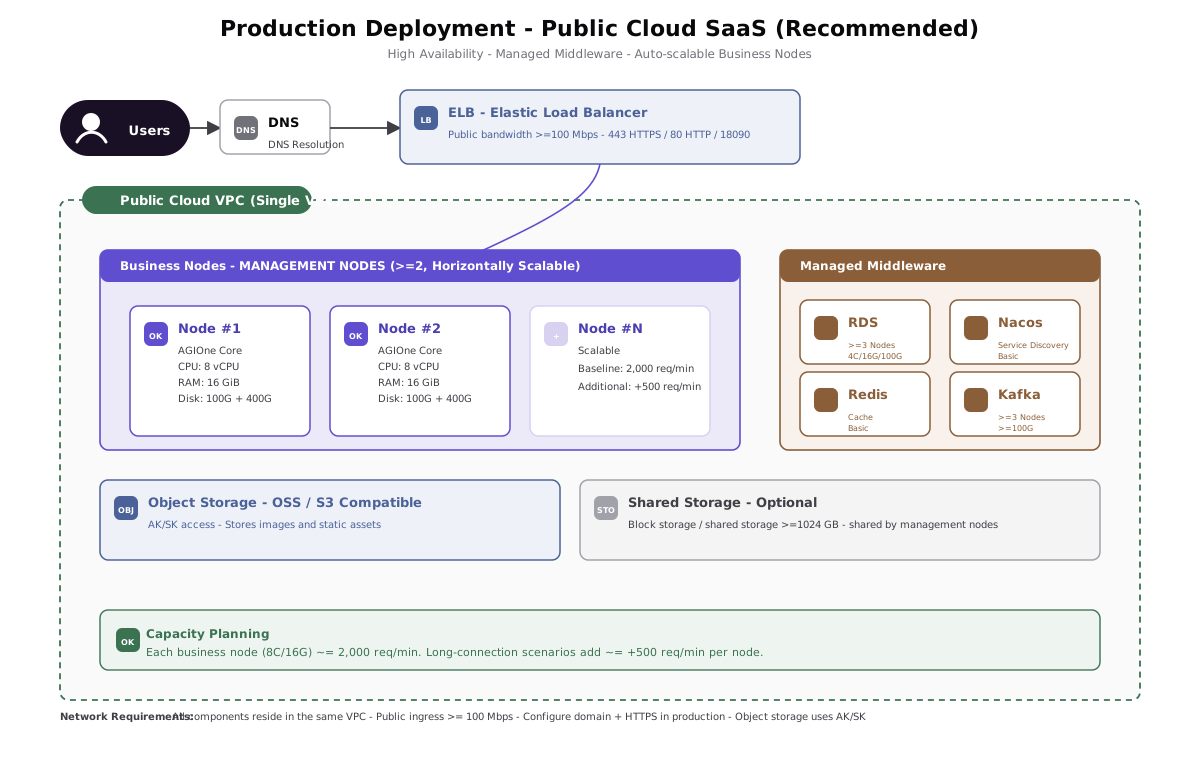
5.2 Architecture Diagram
5.3 Deployment Notes
- Use cloud-provider managed database, Redis, Nacos, Kafka, and object storage only within the compatibility matrix to reduce operational complexity.
- Business nodes can expose an entry through a load-balancing service accepted for the project. After a domain name is configured, use 443 (HTTPS) and 80 (HTTP redirect).
- All internal components are located in the same VPC. Do not expose internal ports across VPCs.
- Recommended public bandwidth is >= 100 Mbps, adjustable according to business volume.
6. Management Plane - Production Deployment (Private Cloud / IDC)
Applicable to scenarios where public cloud cannot be used and data must be fully self-managed.
6.1 Resource Requirements
6.1.1 Required Resources (Nodes)
| Role | Nodes | CPU | Memory | Disk | Network | Description |
|---|---|---|---|---|---|---|
| Business nodes | >= 2 | >= 8 cores | >= 16 GB | >= 200 GB | LAN; Need access Internet, bandwidth >= 100M | Deploy AGIOne business services |
| Database / middleware nodes | >= 2 | >= 8 cores | >= 16 GB | >= 200 GB | LAN | Deploy MariaDB (primary/replica), Nacos, Redis, Kafka, and MinIO |
| Total | >= 4 | - | - | - | - | - |
6.1.2 Optional Resources
| Resource | Required / Optional | Recommended Configuration | Purpose |
|---|---|---|---|
| Load Balancer (LB) | Optional | Hardware LB such as F5, or software LB such as Nginx / HAProxy + Keepalived | Provides a unified entry point, traffic distribution, and health checks. Without an LB, DNS round-robin can connect directly to business nodes, but it does not provide health checks or automatic removal of failed nodes. |
| NAS Shared Storage | Optional | Capacity >= 1024 GB; mounted to all nodes through NFS / CIFS | Stores shared logs, service configuration, shared files, and temporary data that multiple nodes must access. Without NAS, use local disks with a log collector such as Filebeat or Fluent Bit. |
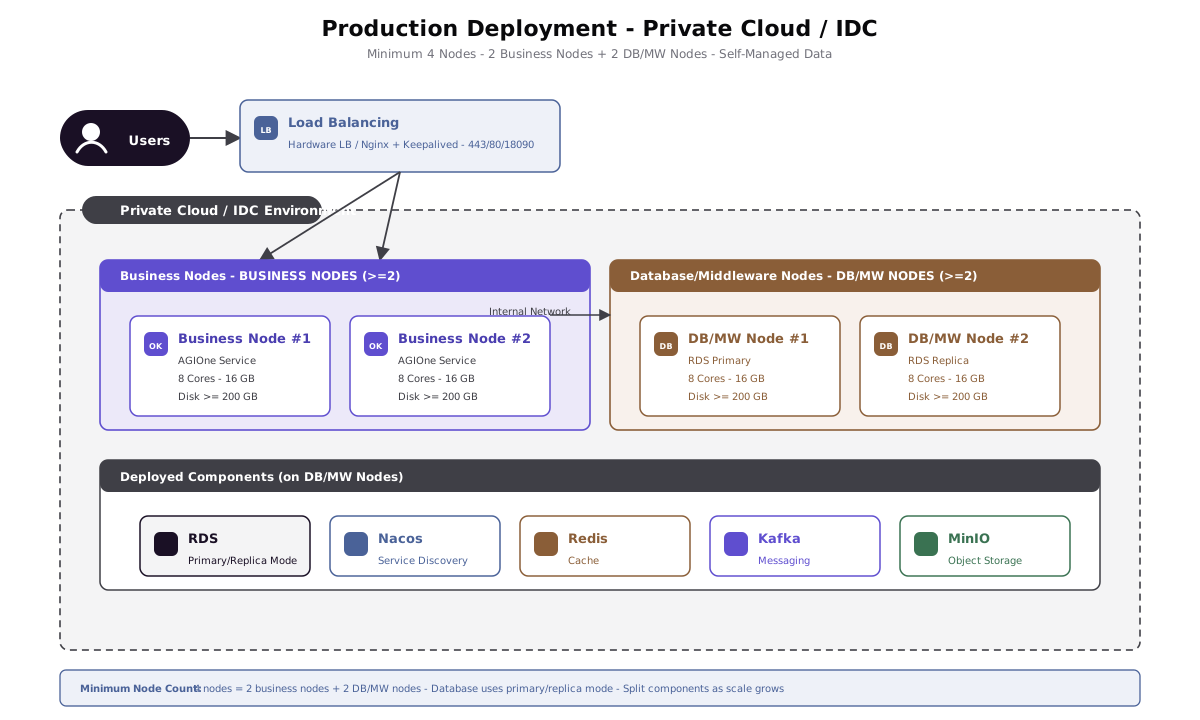
6.2 Architecture Diagram
6.3 Deployment Notes
- Start with at least 4 nodes: 2 business nodes + 2 database/middleware nodes.
- The database uses primary/replica mode. It is recommended to deploy databases and middleware separately, and split them into more nodes as business scale grows.
- MinIO provides object storage capabilities as an alternative to public cloud OSS.
- Load balancing is optional: Deploy an LB to provide a unified entry point and high availability. Without an LB, use DNS round-robin to connect directly to business nodes.
- NAS shared storage is optional: Use it for shared logs, service configuration, and other cross-node files. Without NAS, use local disks with a log collection solution.
7. Compute Node Onboarding
7.1 Design Principles
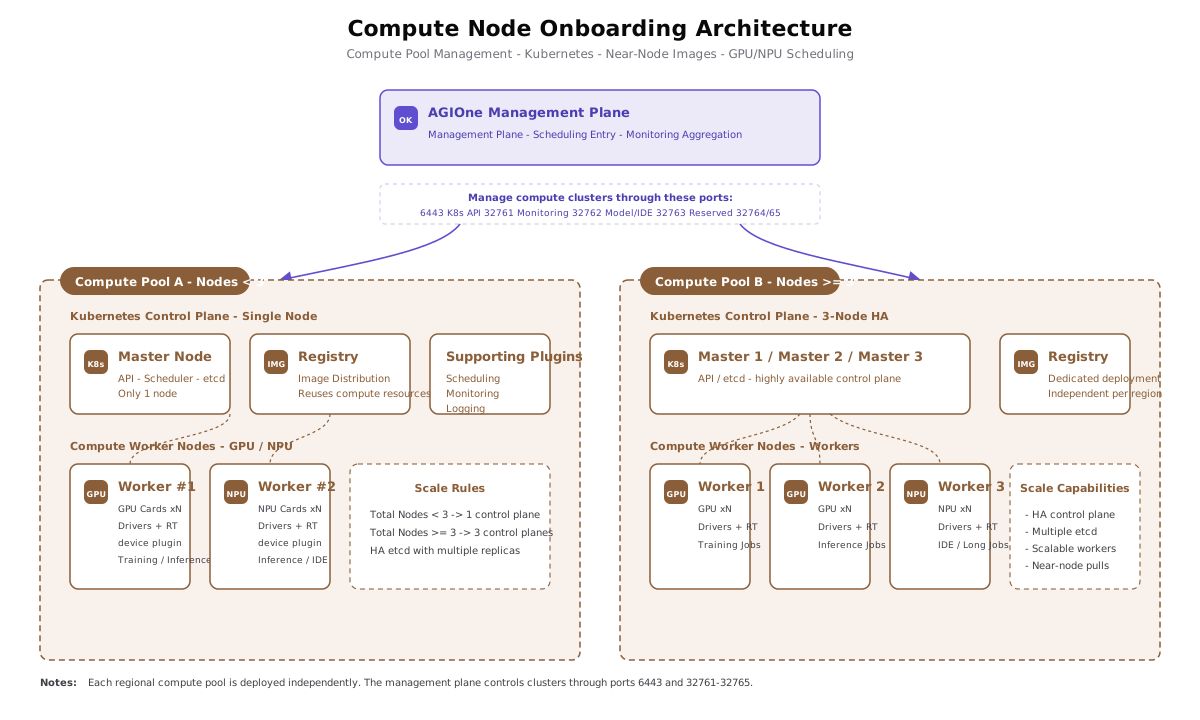
- Each independent regional compute pool is deployed as a logical unit to avoid network jitter caused by cross-region scheduling.
- Each regional compute pool deploys an image service close to compute nodes and can reuse already-onboarded node resources.
- Deploy a Kubernetes cluster and supporting plugins for scheduling, monitoring, and related capabilities.
7.2 Kubernetes Control Plane Scale
Node requirements:
| Total Compute Pool Nodes | Kubernetes Control Plane Nodes | Description |
|---|---|---|
| < 3 nodes | 1 node | Single control plane, suitable for small compute pools |
| >= 3 nodes | 3 nodes | Highly available control plane with multiple etcd replicas |
Storage requirements:
- At least 2 TB NAS storage is required.
- Optional: S3-compatible object storage larger than 2 TB is supported.
Network requirements:
- The management network must be in the same LAN.
- Inter-node network bandwidth must be >= 1000 Mbps.
- Optional internet access: all nodes can access the internet.
7.3 Architecture Diagram
7.4 Externally Exposed Ports
Each compute cluster exposes the following ports to the management plane through NodePort:
| Port | Purpose |
|---|---|
| 6443 | Kubernetes API Server |
| 32761 | Monitoring interface |
| 32762 | Model and IDE invocation port |
| 32763 | Reserved extension port |
| 32764 | Reserved extension port |
| 32765 | Reserved extension port |
7.5 Deployment Notes
- Compute nodes should have GPU / NPU drivers, container runtime such as containerd, and the corresponding device plugin installed and validated in advance.
- The image service should be located in the same Layer 2 or low-latency network as the compute nodes to accelerate pulling large model images.
- For multi-region deployment, each region should maintain an independent near-node image service to avoid cross-region image pulls.
8. Network Planning
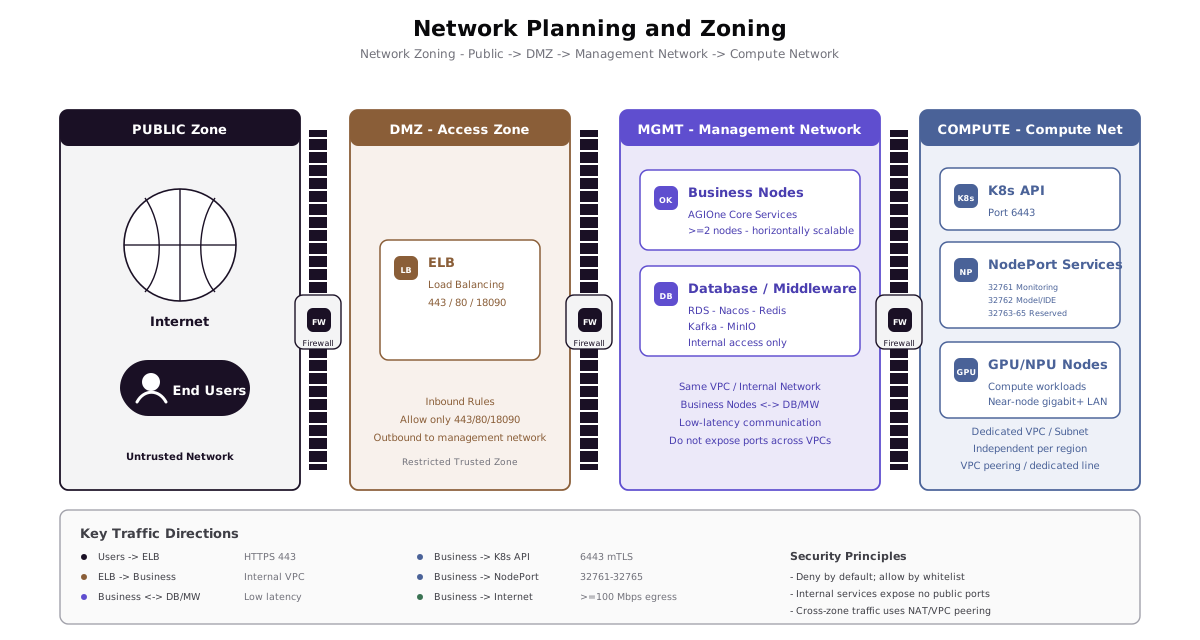
8.1 Network Zoning
8.2 Network Requirements Overview
| Traffic Direction | Requirement |
|---|---|
| Users -> ELB | Public network; 443/HTTPS is recommended in production, with DNS resolving the domain name |
| ELB -> business nodes | Internal network, same VPC |
| Business nodes <-> DB / middleware | Internal network, same VPC, low latency |
| Business nodes -> object storage | AK/SK authentication; VPC internal endpoint can be used |
| Business nodes -> compute cluster | Through ports 6443 and 32761-32765 |
| Compute nodes -> near-node image service | Compute-pool local LAN, gigabit or higher recommended |
| Management nodes -> Internet | Required for PoC; outbound access is recommended in production for pulling images and upgrades, bandwidth >= 100 Mbps |
8.3 VPC / Subnet Recommendations
- Management VPC: All management nodes, RDS, Nacos, Redis, Kafka, and MinIO are located in the same VPC. Subnets can be divided into business-node subnets and data-node subnets.
- Compute VPC: Each regional compute pool uses an independent VPC or subnet and connects to the management VPC through VPC peering or a dedicated line.
- Security groups: Deny by default and allow only the ports listed in the following "Port List" section.
9. Port List
9.1 Management Plane Ports
| Port | Protocol | Source | Purpose |
|---|---|---|---|
| 18090 | TCP / HTTP | Users / internal | Default HTTP service port (used by default in PoC) |
| 80 | TCP / HTTP | Public users | Production environment HTTP after domain configuration, usually redirects to 443 with 301 |
| 443 | TCP / HTTPS | Public users | Production environment HTTPS after domain configuration |
9.2 Compute Cluster Ports
| Port | Protocol | Source | Purpose |
|---|---|---|---|
| 6443 | TCP | Management plane | Kubernetes API Server |
| 32761 | TCP | Management plane | Monitoring interface |
| 32762 | TCP | Management plane | Model and IDE invocation |
| 32763 | TCP | Management plane | Reserved extension port |
| 32764 | TCP | Management plane | Reserved extension port |
| 32765 | TCP | Management plane | Reserved extension port |
9.3 Internal Service Ports (Reference)
Databases, middleware, and internal application services should be exposed only within the VPC / LAN and not to the public internet. The actual check scope is adjusted automatically based on self-managed middleware, managed middleware, and optional service groups:
| Component / Service Group | Default Port (Reference) |
|---|---|
| RDS (MySQL family) | 3306 |
| Nacos | 8848 / 9848 / 9849 |
| Redis | 6379 |
| Kafka / Kafka UI | 9092 / 9093 / 18091 |
| MinIO / MinStore | 8080 / 9000 / 9001 |
| AGIOne base application services | 3000 / 4000 / 5007 / 7002 / 7003 / 8031 / 8032 / 8033 / 8080 / 8089 |
kubem optional service group | 8021 / 8022 / 18088 |
cloud optional service group | 8011 / 8017 / 8012 / 8001 / 8002 |
core_isync optional service group | 7091 / 18181 / 18082 |
Actual ports depend on the version and configuration used during deployment.
10. Pre-Deployment Checklist
Before deployment, confirm each item to ensure a smooth rollout:
Base Environment
- [ ] Deployment mode has been selected according to the scenario (PoC / public cloud / private cloud IDC)
- [ ] Node quantity and specifications meet resource requirements
- [ ] Operating system and kernel version meet requirements
- [ ] Time is synchronized (NTP), and all nodes use a consistent time zone
Fixed download page: Download link
After opening the page, copy Download URL and MD5 URL. MD5 detects download or transfer corruption only and does not authenticate the package publisher. For production delivery, independently obtain the outer .tar.gz SHA-256 digest through an access-controlled channel and verify it before extraction.
# 1. Download the bundle and verify MD5
ssh root@<target>
AGIONE_RELEASE_PAGE="https://agione.pro/release/download/agione-release-latest"
AGIONE_RELEASE_URL="<copy-the-Download-URL-from-the-page>"
AGIONE_RELEASE_MD5_URL="<copy-the-MD5-URL-from-the-page>"
AGIONE_RELEASE_ARCHIVE="${AGIONE_RELEASE_URL##*/}"

mkdir -p /opt/hyperone && \
cd /opt/hyperone && \
curl -fL -o "$AGIONE_RELEASE_ARCHIVE" "$AGIONE_RELEASE_URL" && \
curl -fL -o "$AGIONE_RELEASE_ARCHIVE.md5" "$AGIONE_RELEASE_MD5_URL" && \
echo "$(awk '{print $1}' "$AGIONE_RELEASE_ARCHIVE.md5") $AGIONE_RELEASE_ARCHIVE" | md5sum -c -# 2. Production delivery: verify the outer archive SHA-256
AGIONE_RELEASE_SHA256="<outer-archive-SHA-256-from-a-trusted-delivery-channel>"
echo "$AGIONE_RELEASE_SHA256 $AGIONE_RELEASE_ARCHIVE" | sha256sum -c -
# 3. Extract after verification, then verify the split bundle
AGIONE_RELEASE_DIR="$(tar -tzf "$AGIONE_RELEASE_ARCHIVE" | head -1 | cut -d/ -f1)"
tar -zxvf "$AGIONE_RELEASE_ARCHIVE"
cd "/opt/hyperone/$AGIONE_RELEASE_DIR"
chmod +x ./agione
./agione verify-bundleverify-bundle validates extracted split-bundle files against SHA256SUMS. Do not use AGIONE_SKIP_BUNDLE_VERIFY=1 to bypass this check in formal delivery.
Network
- [ ] Management nodes are located in the same VPC
- [ ] Management nodes can access the Internet, or offline images have been prepared
- [ ] Security group / firewall rules have opened the ports in the port list
- [ ] The compute cluster and management plane have network connectivity
Domain Name and Certificate (Production)
- [ ] Domain name has been applied for and resolved
- [ ] HTTPS certificate has been prepared
- [ ] ELB listeners for 443 / 80 have been planned
Compute Cluster
- [ ] The number of nodes in each regional compute pool has been confirmed, and the K8s control plane scale has been determined (1 or 3)
- [ ] GPU / NPU drivers have been installed and validated
- [ ] Near-node image service nodes have been planned
- [ ] NodePort ports 6443 and 32761-32765 have been allowed for the management plane
11. Appendix
11.1 Resource Specification Quick Reference
| Deployment Mode | Minimum Nodes | Minimum Per-Node Specification | Total Resource Reference |
|---|---|---|---|
| PoC All in One | 1 | 8C / 24G / 200G | 8C / 24G / 200G |
| Public Cloud (business nodes) | 2 | 8C / 16G / 200G | 16C / 32G / 1 TB+ |
| Private Cloud IDC | 4 | 8C / 16G / 200G | 32C / 64G / 800G+ |
11.2 Capacity Estimation Reference
- Baseline: each business node (8C / 16G) supports approximately 2,000 requests/minute
- Scaling: each additional business node adds approximately +500 requests/minute in long-lived connection / complex request scenarios
- Actual capacity should be evaluated based on request complexity, model inference duration, number of concurrent sessions, and other factors.
11.3 Terminology Quick Reference
| Term | Description |
|---|---|
| AGIOne | Name of this platform |
| All in One | Simplified mode that deploys all components on a single node |
| VPC | Virtual Private Cloud |
| ELB | Elastic Load Balancer |
| RDS | Relational Database Service |
| AK/SK | Access Key / Secret Key |
| NodePort | One of the Kubernetes service port exposure methods |
| Regional compute pool | A group of compute nodes physically located in the same geographic region and connected over the network |