Add AGIOne as a model provider to Openclaw
Installing Openclaw
Installation process (omitted)
Configuration Model (Using AGIOne as the model provider)
Manually modify the configuration file:
Prompt message: Modifying the AGIOne model via the openclwa command without first modifying the configuration file is not currently supported.- Edit
~/.openclaw/openclaw.json, and add the AGIOne model provider inmodels.providers.- provider: agione (User-defined)
- baseUrl:
https://agione.pro/hyperone/xpai/api - api: openai-completions
- id: "Model ID on AGIOne"
- name: "Model name on AGIOne"
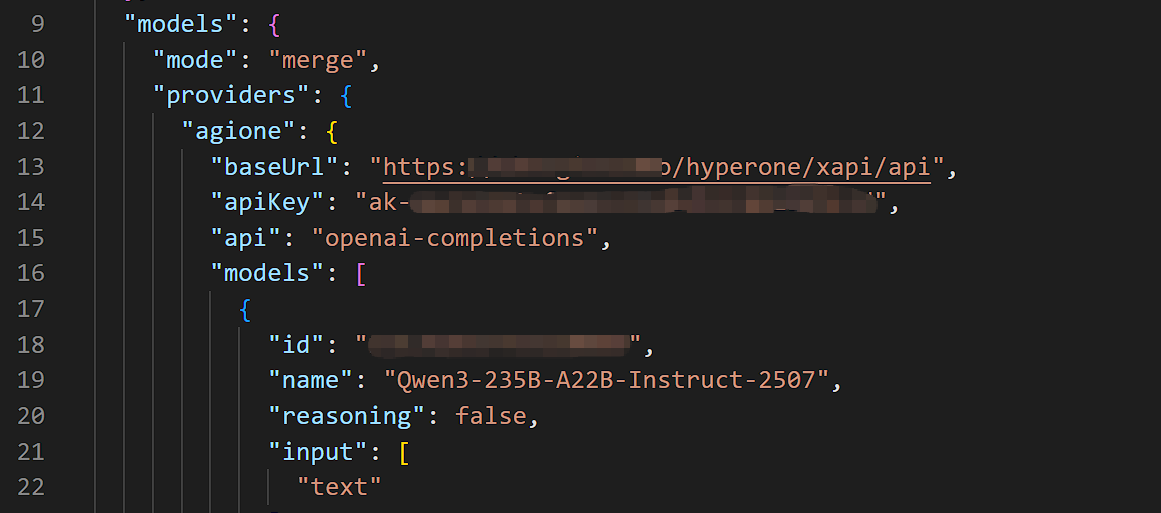
- In
models.agents, modify the AGIOne model to be used.- primary: "agione/Model ID on AGIOne"
# Format:agione/model id,The agione and providers need to be consistent.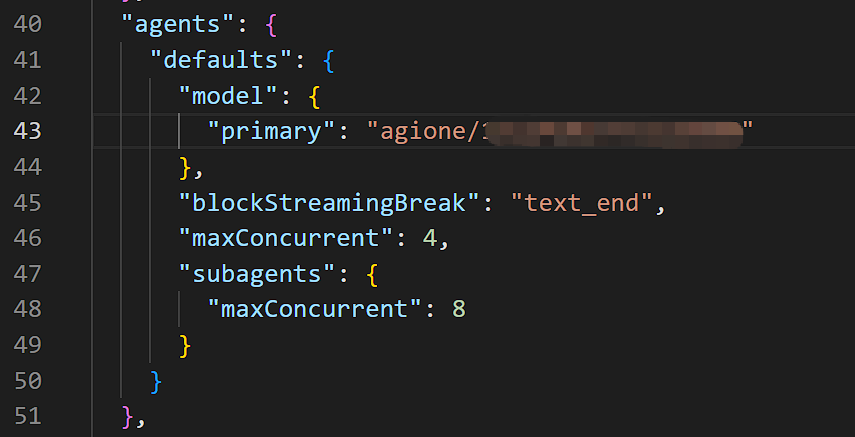
- primary: "agione/Model ID on AGIOne"
- Restart the Gateway service.
Plain
openclaw gateway restart

# If you are using a different version or deployment method, simply restart the service.- Test Response: In chat, send a test message such as "Hi". If a normal response is returned, the configuration is successful.
