Core Capabilities and Features
Document Information
Version: v1.1 Updated: 2026-07-23 Functional baseline: User Manual updated on 2026-07-22 and the current AI Infra On-Cloud business workflow
Overview
AGIOne is a one-stop intelligent compute and model management platform purpose-built for enterprise-grade large model productionization. Centered on the end-to-end closed loop of "Compute → Model → Service → Operations", it delivers eight core capabilities:
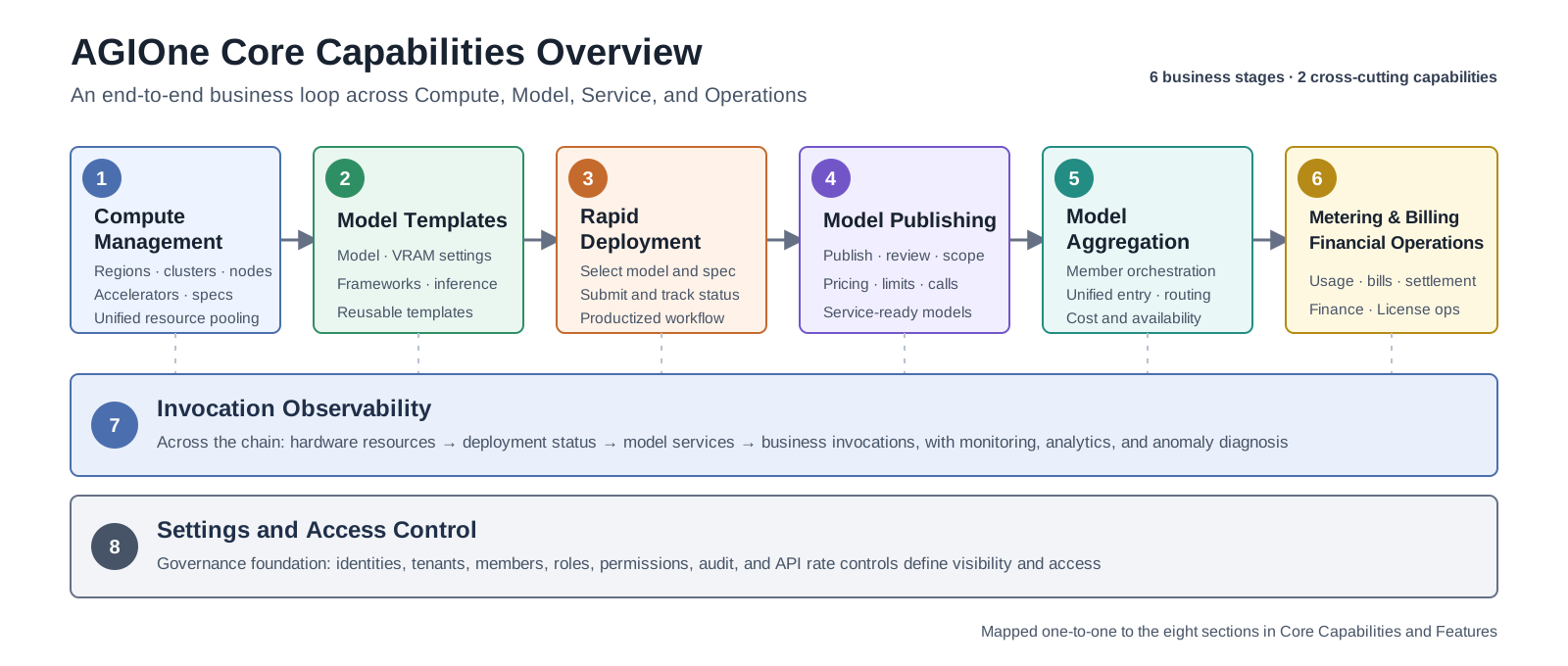
Figure 1 Overview of AGIOne's Eight Core Capabilities (six business stages and two cross-cutting capabilities)
The first six capabilities form the business path from compute preparation to financial operations. The seventh, Invocation Observability, provides end-to-end visibility, analytics, and anomaly diagnosis. The eighth, Settings and Access Control, provides governance for identities, tenants, permissions, audit, and API rate control.
The first three capabilities are presented through separate AI Infra On-Prem and AI Infra On-Cloud paths. On-Prem covers local compute and model deployment, while On-Cloud covers multi-cloud resource access, cloud deployment assets, and recommendation-driven deployment.
Reading Note
This page retains the original capability framework and conceptual diagrams. Times, strategies, performance figures, and pricing values in the diagrams and examples explain design considerations and are not current-version commitments. The current user manual also documents Billing and Settings as product modules for finance, License, identity, audit, and API rate-control operations. Use the User Manual, Support Matrix, and target environment as the source of truth. Current status: Huawei Cloud access is temporarily unsupported; RAG and Function Calling are planned.
1. Compute Resources — On-Prem Management and Multi-Cloud Access
1.1 AI Infra On-Prem
1.1.1 Capability Overview
Through AI Infra On-Prem, AGIOne manages regions, availability zones, clusters, nodes, and accelerator resources. Specifications, templates, quotas, and authorization provide selectable compute for workloads. Onboarding and model runtime still require validation of the accelerator, driver, runtime, image, inference engine, and model combination.
1.1.2 Supported Heterogeneous Accelerators
| Vendor | Architecture / Series | Representative Models | Adaptation Note |
|---|---|---|---|
| NVIDIA | Hopper | H800 / H200 / H100 / H20 | Validate driver, CUDA, image, and inference engine by project |
| NVIDIA | Ampere | A100 / A800 / A40 / A30 / A10 / RTX A Series / RTX 30 Series | Confirm device memory and data-center deployment conditions by model |
| NVIDIA | Ada | L40 / L40S / L20 / L20S / L4 / L2 / RTX 4090, etc. | Workstation or consumer models require additional stability and delivery validation |
| Huawei Ascend | Ascend 910 | Ascend 910B / Ascend 910C | Validate CANN, MindIE, driver, image, and model by project |
| Enflame | Enflame | S60 | Validate vendor driver, runtime, inference framework, and model |
| Biren | Biren | 106 | Validate vendor driver, runtime, inference framework, and model |
| Hygon | BW | BW200 | Validate vendor driver, runtime, inference framework, and model |
1.1.3 Core Sub-capabilities
Node Onboarding and Lifecycle Management
- Cluster and node onboarding: Operators maintain regions, availability zones, clusters, nodes, and accelerator objects. The actual onboarding scope depends on network and installation conditions.
- Node initialization: Follow the Compute Node Onboarding and Installation Guide to prepare Kubernetes, the container runtime, drivers, and device plugins.
- Images and runtime environments: Use images, image services, and templates to maintain the environments required by workloads.
- Exception handling: Use node, device, workload monitoring, and event records to locate issues. Recovery behavior depends on the Kubernetes configuration and delivery solution.
Resource Scheduling and Allocation Strategies
| Scheduling Dimension | Strategy | Use Case |
|---|---|---|
| Hardware-label-based scheduling | Uses node and device labels to distinguish accelerator types | Select the corresponding accelerator for different runtime environments |
| Compute-spec-based scheduling | Selects an available specification that meets accelerator type, card count, and memory requirements | Model deployment and training workloads |
| Authorization-scope-based scheduling | Uses only regions, resource pools, and specifications visible to the current tenant, business scope, or user | Multi-tenant resource use |
| Multi-card workload configuration | Configures card count and parallelism parameters according to the template, model, and cluster conditions | Single-node or multi-node multi-card workloads |
Hardware Monitoring Metrics
The platform can display collected accelerator metrics on device and monitoring pages. The collectors, metric set, and refresh interval depend on the accelerator type, monitoring configuration, and deployed version. Examples include:
- GPU/NPU compute utilization & SM occupancy
- VRAM usage & memory bandwidth
- Core temperature & memory temperature
- Real-time power draw & TDP utilization
- NVLink / InfiniBand bandwidth & link health
1.2 AI Infra On-Cloud
1.2.1 Capability Overview
Through AI Infra On-Cloud, AGIOne provides unified access to cloud platforms, cloud accounts, regions, resource pools, and compute specifications. It organizes inference resources from different cloud providers into authorized, filterable compute candidates that can be used for model deployment. Operators prepare cloud resources and access scopes, while End Users deploy models from recommended solutions within their authorized scope.
Cloud resource preparation follows this relationship:
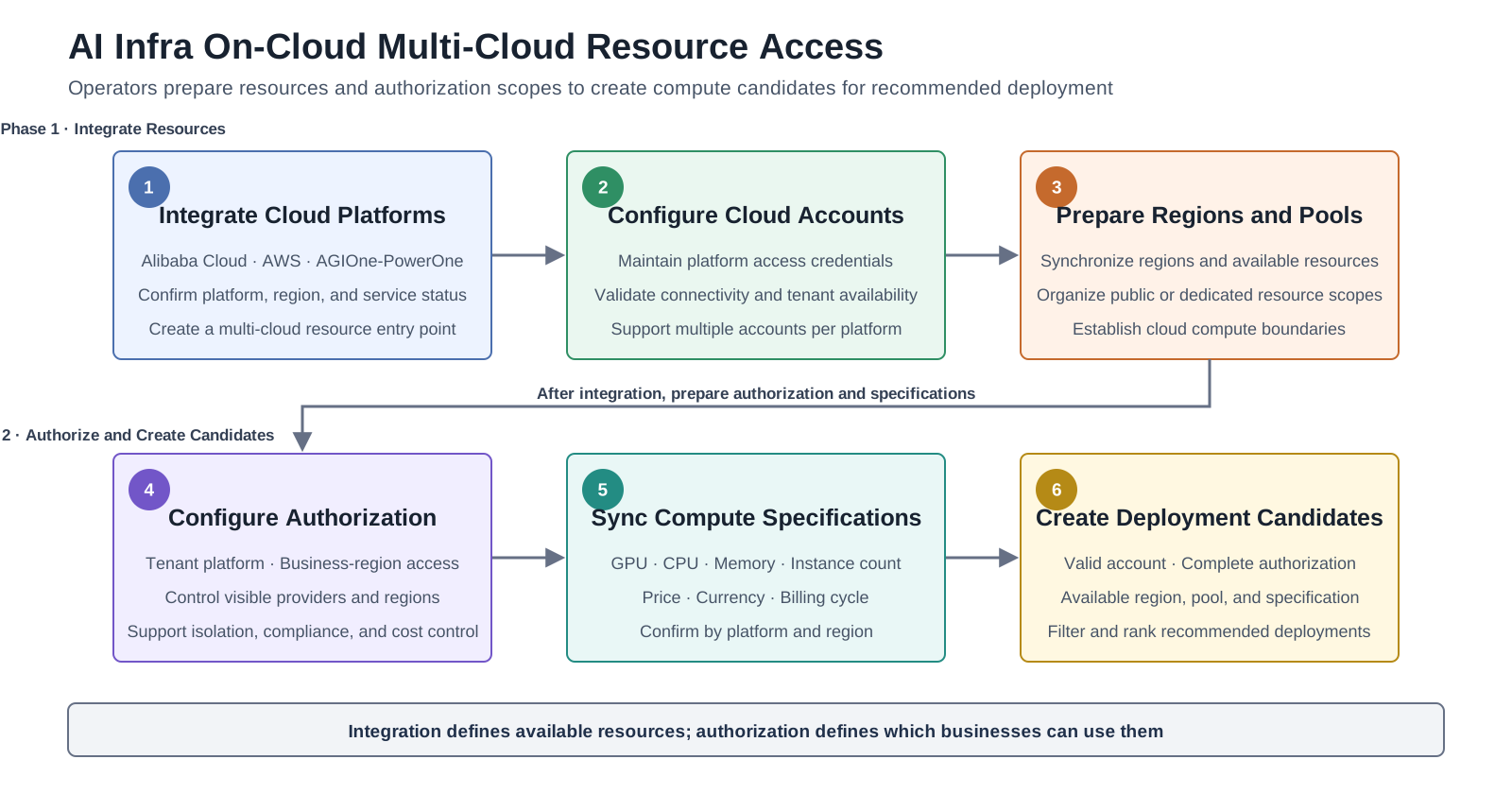
Figure 1-A AI Infra On-Cloud Multi-Cloud Resource Access Workflow
1.2.2 Core Resource Objects
| Resource Object | Purpose | Usage Boundary |
|---|---|---|
| Cloud platform | Identifies integrated provider capabilities such as Alibaba Cloud, AWS, and AGIOne-PowerOne | Available platforms depend on the current environment and deployed version |
| Cloud account | Provides the credentials required for the platform to operate cloud-provider resources | At deployment confirmation, users can select only an available account that matches the candidate provider |
| Region and resource pool | Organizes provider regions, available resources, and dedicated resource scopes | Business authorization is still required after a resource pool is created |
| Business-region authorization | Restricts the cloud platform and region combinations available to a business or tenant | Supports multi-tenant isolation, compliance, and cost control |
| Compute specification | Describes GPU, CPU, memory, instance count, price, and billing cycle | Specifications and prices must be confirmed separately for each platform and region |
1.2.3 Multi-Cloud Resource Management
- Account and region management: Operators maintain cloud platforms and accounts, and synchronize available regions, resource pools, and specifications.
- Authorization-scope control: Resource-pool and business-region authorization determine which providers and regions are visible to each business.
- Specification and cost information: Deployment candidates can display accelerator type and count, CPU, memory, instance count, estimated cost, and currency.
- Cloud-provider adaptation: Provider components query resources and create services. Fields and lifecycle capabilities may vary by provider.
- Runtime observation: After deployment, users can review task status, provider events, invocation logs, and resource monitoring.
2. Model Deployment Assets — On-Prem Templates and Cloud Configurations
On-Prem and On-Cloud use different asset structures for local-compute and cloud-model deployment:
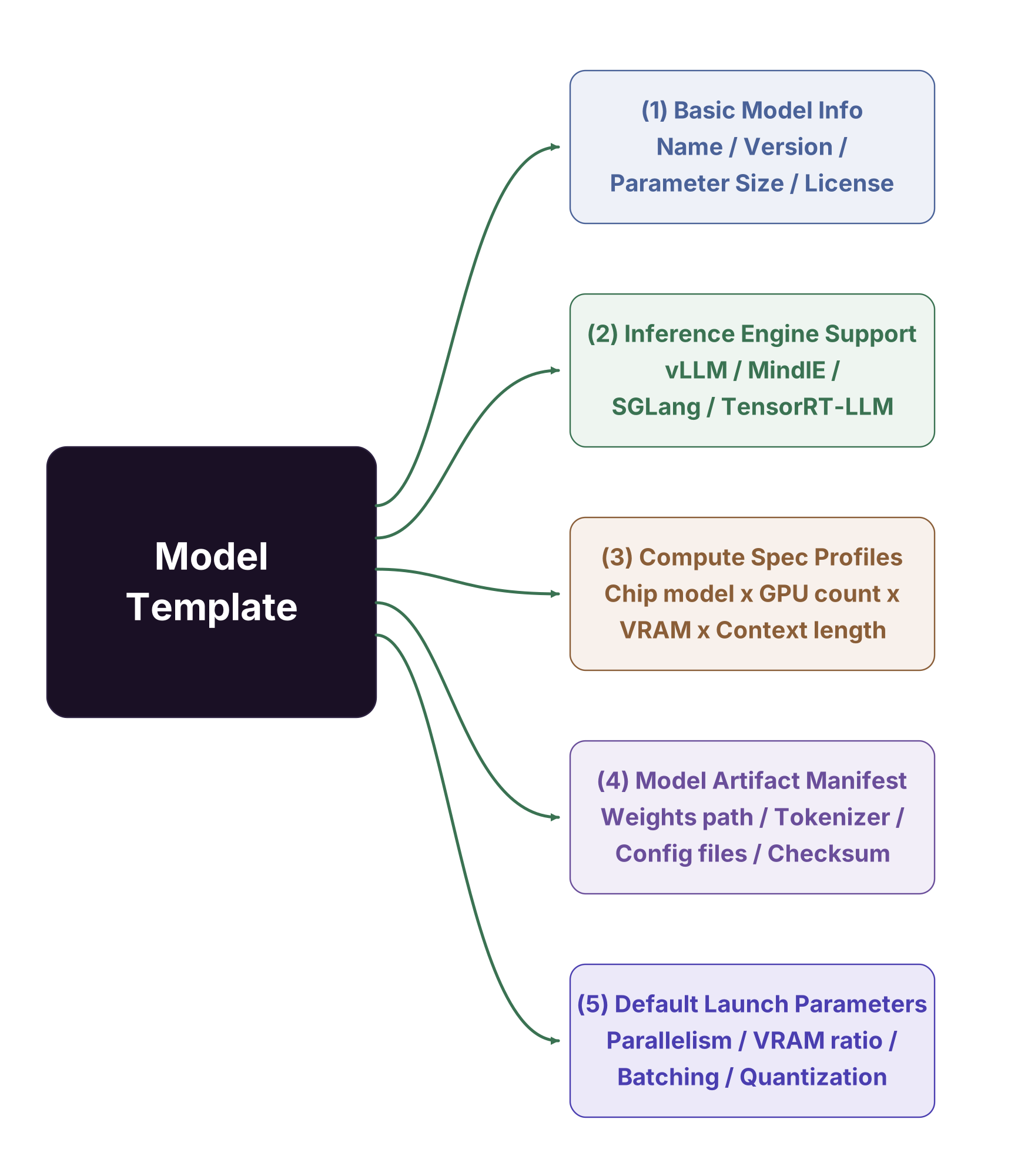
Figure 2 On-Prem and On-Cloud Model Deployment Assets
| Deployment Scope | Components | User Manual |
|---|---|---|
| On-Prem | Model configurations, VRAM estimation, framework configurations, and inference templates | Model Configurations / VRAM Estimation / Framework Configurations / Inference Templates |
| On-Cloud | Runtime images, inference frameworks, and the model catalog; model records further connect metadata models, cloud deployment points, cloud models, compute solutions, and output configurations | Runtime Images / Inference Frameworks / Model Catalog |
2.1 AI Infra On-Prem
2.1.1 Capability Overview
AGIOne uses model configurations, VRAM estimation, framework configurations, and inference templates to preserve reusable local-deployment parameters. Template availability depends on the operator's configuration and validation of the target model, compute specification, image, and inference engine.
2.1.2 Built-in Model Template Examples
Pre-built Templates for Mainstream Large Models
The table below is retained as a capacity-planning example. It does not mean that the current environment includes these models, nor does it commit to compatibility for any model, card count, context length, or inference engine. Use the current template list and actual test results during delivery.
| Model Family | Representative Versions | Parameter Scale | Recommended Compute Spec | Inference Engine | Context Length |
|---|---|---|---|---|---|
| DeepSeek | V3.1 / R1 | 671B MoE / 14B-70B | H200×8 / H20×2 | vLLM | 32K / 64K / 128K |
| Qwen | QwQ-32B | 32B | H20×1 / L20×4 | vLLM | 32K / 64K |
| Qwen-VL | 2 / 3 | 14B / 72B | L20×1 / L20×4 | vLLM | Multimodal |
| Llama3 | 8B | 8B | L20S×1 / Ascend 910B×1 | vLLM / MindIE | 32K |
| GLM | 5.1 | 744B | H20×16 | vLLM | 32K / 64K / 128K |
| Embedding / Reranker | bge-m3 / bge-reranker / qwen3-embedding | — | L20×1 / L4×2 | vLLM | — |
2.1.3 Template Version Management
- On-Prem platform templates: Operators maintain the model configurations, VRAM estimation rules, framework configurations, and inference templates available in the current environment.
- Project templates: A project can preserve dedicated templates based on validated combinations of models, images, compute, and parameters. Confirm versions and resource conditions before reuse.
2.2 AI Infra On-Cloud
2.2.1 Capability Overview
AI Infra On-Cloud combines model presentation data with cloud deployment capabilities to create model records that can be published and recommended. Names, tags, and capabilities can come from a unified metadata model. AGIOne maintains where the model can be deployed, which runtime and specifications it uses, and how it becomes an accessible inference service.
The cloud model asset preparation workflow is:
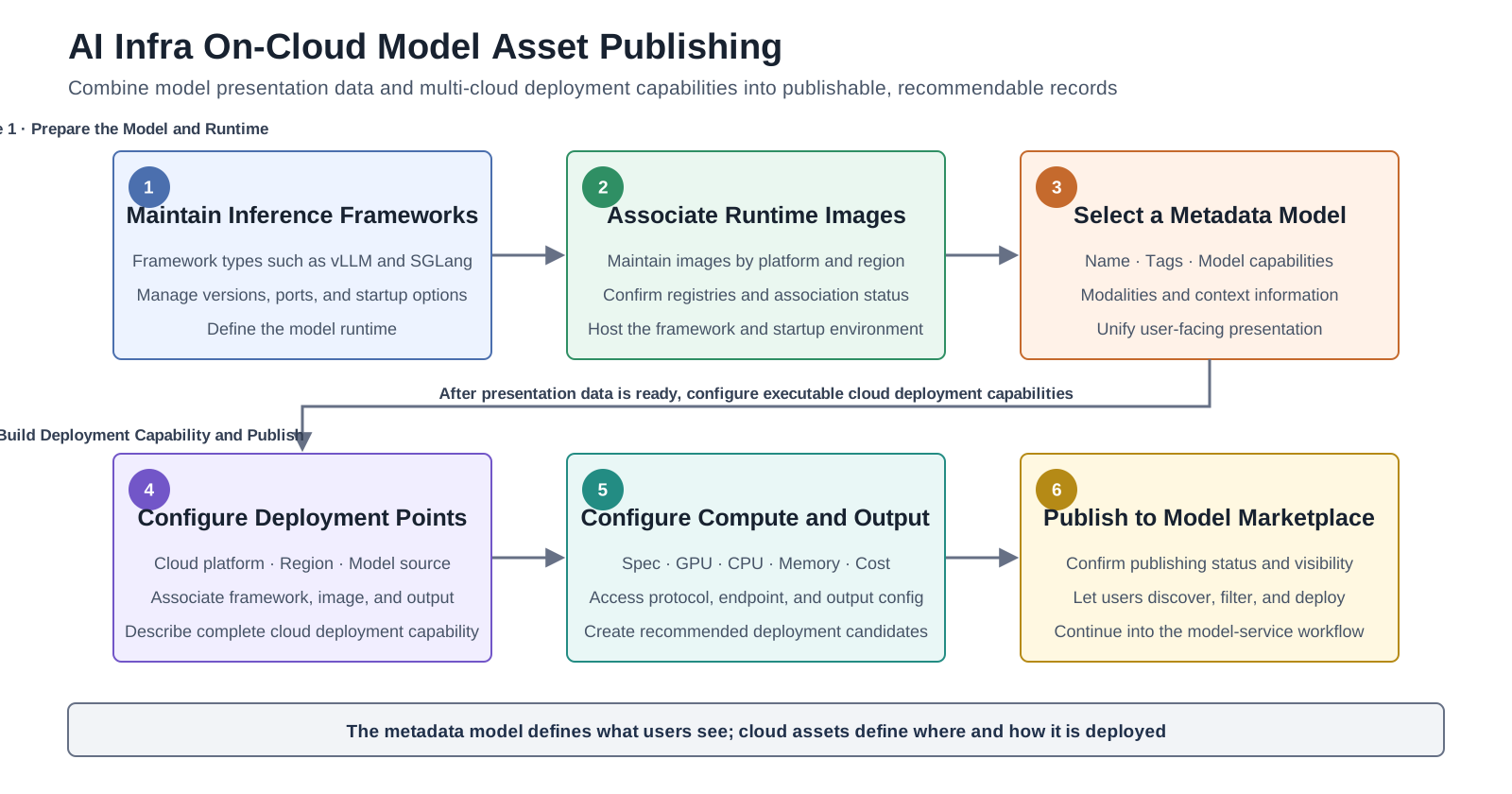
Figure 2-A AI Infra On-Cloud Model Asset Publishing Workflow
2.2.2 Cloud Deployment Assets
| Deployment Asset | Main Content | Purpose |
|---|---|---|
| Inference framework | Framework types such as vLLM and SGLang | Defines the inference runtime used by the model |
| Framework version | Version, port, startup parameters, environment variables, and compatibility conditions | Provides reusable runtime configurations for different models and providers |
| Runtime image | Container images available on the cloud platform and their association status | Hosts the inference framework and model startup environment |
| Model catalog record | Metadata-model association, publishing status, and model capability references | Creates a deployable model in the user-facing model marketplace |
| Cloud deployment point | Cloud platform, region, model source, framework, image, and output configuration | Describes a model's complete deployment capability in one cloud environment |
| Compute solution | Specification, GPU, CPU, memory, instance count, and billing information | Creates a resource candidate for recommended deployment |
2.2.3 Boundary Between Model and Deployment Information
| Information Scope | Primary Source | Display or Usage |
|---|---|---|
| Name, tags, and model capabilities | Unified metadata model | Used for marketplace display and filtering |
| Publishing status and visibility | AGIOne model catalog | Determines whether users can discover the model |
| Cloud platform, region, and specification | Cloud deployment point and compute solution | Used to filter and generate deployment candidates |
| Framework, image, and startup configuration | Inference framework and runtime image | Maintained by operators and automatically matched during user deployment |
| Model source and output configuration | Provider model assets or model-storage configuration | Used to create the service and generate access details |
2.2.4 Pre-Publishing Checklist
- Associate a displayable metadata model and confirm its name, tags, and capability information.
- Provide at least one complete cloud deployment point.
- Associate the deployment point with an available inference framework version and runtime image.
- Confirm specification, resource, and billing information in the compute solution.
- Ensure that the model source, output configuration, and API access configuration meet target-provider requirements.
- Treat the current environment, provider APIs, and deployment validation results as the source of truth for actual publishing capability.
3. Rapid Deployment — On-Prem and On-Cloud Paths
3.1 AI Infra On-Prem
3.1.1 Capability Overview
With prepared models, frameworks, images, specifications, and authorized resources, AGIOne provides a productized workflow of "Select a model → Select a specification → Submit the deployment." Operators prepare the underlying resources and deployment assets, while End Users start rapid deployment from their currently visible scope and review the result.
3.1.2 Three-Step Rapid Deployment Workflow
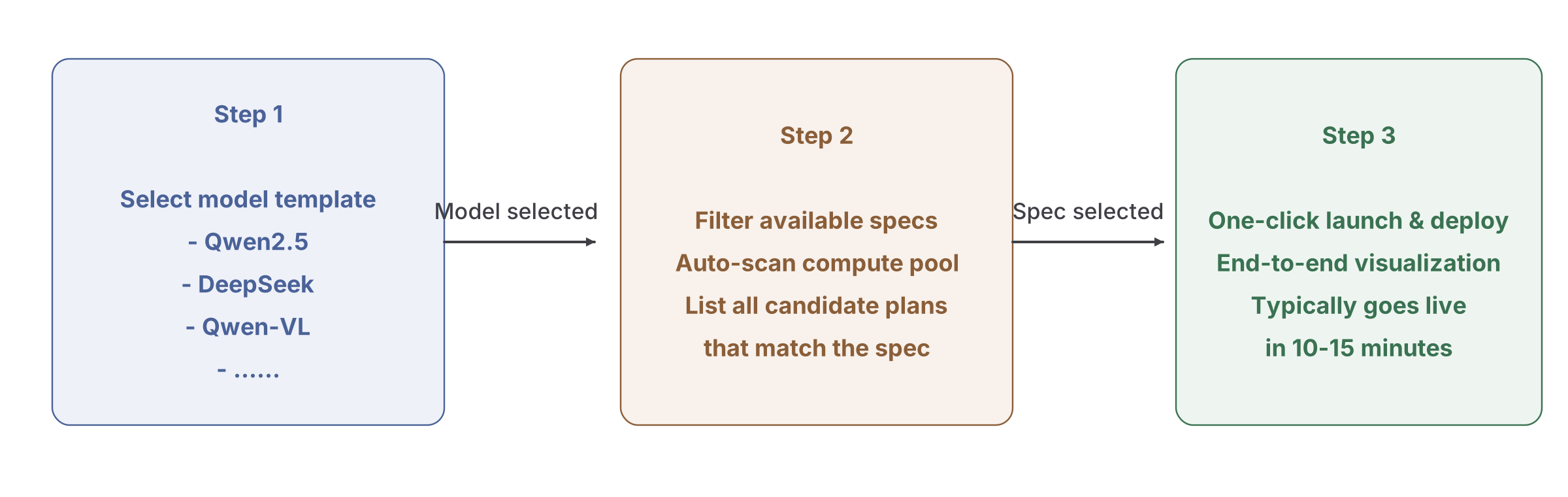
Figure 3 Three-Step Rapid Deployment Workflow
3.1.3 Intelligent Spec Filtering
After a user selects a model, the page displays available deployment combinations based on the currently configured and authorized cloud platform, region, model, and compute solution. The following checks illustrate resource relationships to confirm before deployment:
| Filter Criterion | Automated Decision Logic |
|---|---|
| Sufficient VRAM | Computes model weights × quantization factor + KV cache reservation + system overhead |
| Sufficient cards | Verifies free cards in the target compute pool ≥ tensor_parallel_size |
| Sufficient network | For multi-node deployments, validates RDMA bandwidth and latency |
3.1.4 Visualized Deployment Process
After deployment starts, use the UI and status pages to follow each phase and confirm the current deployment state:
| Phase | UI or Status-page Focus | Timing Note |
|---|---|---|
| ① Resource allocation | Confirm that the selected region, resource pool, specification, and quota are available | Depends on resource state |
| ② Container scheduling | Check workload scheduling, node matching, and quota results | Depends on cluster state |
| ③ Image pull | Check image service, authentication, and network status | Depends on image size and network |
| ④ Model loading | Check model storage, mount, accelerator memory, and startup status | Depends on the model and storage |
| ⑤ Health check | Check deployment status, monitoring, and event records | Depends on startup and probe configuration |
Deployment time depends on compute availability, images, model weights, storage, network, and cluster state. This document does not promise a fixed completion time.
3.1.5 Failure Rollback and Diagnostics
- When deployment fails, first review deployment status, monitoring, events, and related logs to identify the failed phase.
- Common causes include insufficient quota or capacity, unavailable images, storage mount failures, incompatible model assets, and network errors.
- Resource cleanup and retry should follow the capabilities available on the current page and the delivery solution; automatic rollback is not assumed.
3.2 AI Infra On-Cloud
3.2.1 Capability Overview
AI Infra On-Cloud uses recommendation-driven deployment. End Users express business intent through the model, deployment mode, business preference, and provider scope. The platform then generates candidate solutions from cloud accounts, regions, frameworks, images, deployment points, and compute solutions prepared by operators, and automatically fills in the underlying runtime configuration.
The recommendation-driven deployment workflow is:
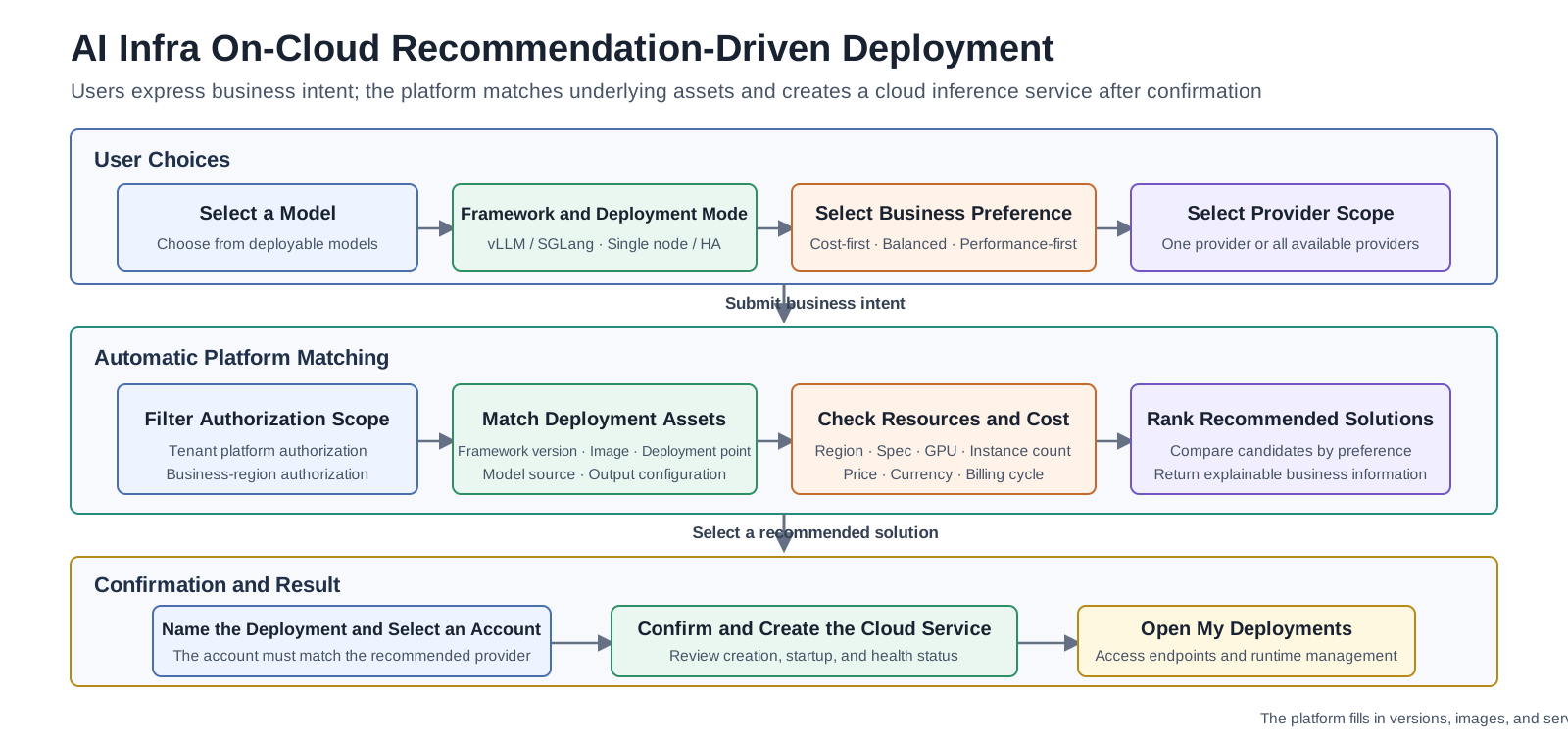
Figure 3-A AI Infra On-Cloud Recommendation-Driven Deployment Workflow
3.2.2 User Choices and Platform Matching
| Scope | User Selects | Platform Handles |
|---|---|---|
| Model and runtime | Model and inference framework type | Compatible framework version and runtime image |
| Deployment mode | Single-node or high-availability deployment | Matching cloud deployment point, node combination, and runtime configuration |
| Business preference | Cost-first, balanced cost and experience, or performance-first | Sorts candidates by resources, price, and availability |
| Provider scope | A specific provider or all available providers | Filters cloud platforms and regions by business-region authorization |
| Final confirmation | Deployment name, recommended solution, and matching cloud account | Model source, specification, output configuration, and service-creation parameters |
3.2.3 Recommended-Solution Details
When selecting a candidate solution, users compare the following business information:
- Cloud platform and region: Which provider and region will host the service.
- Deployment mode: Single-node solutions support rapid validation, while high-availability solutions provide multi-node resilience.
- Resource specification: GPU type and count, CPU, memory, and instance count.
- Cost information: Estimated cost, currency, and billing cycle. The provider and current environment determine the actual bill.
- Framework type: The inference framework type used by the solution; the platform automatically matches the specific version and image.
- Available account: At confirmation, users can select only an account that matches the solution's provider and is available to the current tenant.
3.2.4 Deployment Process and Result
| Phase | Page Focus |
|---|---|
| Pre-deployment validation | Confirm that the cloud account, region authorization, deployment point, framework, image, and specification are complete and available |
| Cloud service creation | The platform submits an inference-service creation request to the target provider |
| Service startup | Review the cloud task status, instance status, and provider-returned events |
| Health and access check | Confirm that service health, the access endpoint, and authentication information are available |
| Runtime management | Review details in My Deployments and use the available page actions to start, stop, or delete the deployment |
3.2.5 Failure Diagnostics
- Account or authorization issues: Check whether the cloud account is valid and whether the target provider and region are within the current business authorization scope.
- Deployment asset issues: Check whether the deployment point is missing a framework version, image, model source, or output configuration.
- Specification issues: Check whether the specification exists and is available in the target region, and ensure that price and currency are not reused across regions.
- Provider task failures: Use deployment status, provider events, and the error summary to identify the failed creation or startup phase.
- Access unavailable: Check service health, the access endpoint, authentication information, and the target provider's invocation protocol.
4. Model Publishing — Exposing Models as Services
4.1 Capability Overview
Model Services allows model providers to publish single models, BYOK Endpoints, or aggregate models; configure the visibility, pricing, and rate-limit fields available on the current page; and submit them for review. After operator approval, End Users can discover, experience, and call authorized models.
4.2 Standardized Endpoint Encapsulation
| Encapsulation Dimension | Details |
|---|---|
| Protocols and fields | Use the invocation example on the target model detail or quick-start page, and confirm behavior against the deployed version |
| Endpoint URL | Use the actual Endpoint and model identifier shown on the target model page; do not reuse documentation example addresses |
| Request / response capabilities | Depend on the target model and current version; Function Calling is currently planned |
4.3 Authentication and Authorization
- Invocation credentials: Use the access credentials provided on the model page or assigned in the current environment, and store and rotate them according to security policy.
- Role responsibilities: Model providers publish models, operators review them, and End Users experience and call authorized models.
- Authorization scope: The tenant, role, model visibility, and resource authorization jointly determine which operations an account can perform.
4.4 Pricing Configuration
Model providers can configure the price fields available on the current publishing page. The following table illustrates pricing requirements only; actual dimensions, currency, and prices depend on environment configuration and commercial rules:
| Pricing Model | Use Case | Example Configuration |
|---|---|---|
| Per-Token (separate input / output rates) | General dialogue, document generation | DeepSeek-V3: input $0.12 / 1K tokens, output $0.48 / 1K tokens |
| Per-call | Fixed-structure requests (OCR, embeddings) | Embedding: $0.001 / call |
| Per-duration | Streaming output, long-running tasks | Speech synthesis: $0.05 / second |
4.5 Multi-dimensional Rate Limiting
The model publishing page can configure invocation-limit fields available in the current version. The exact dimensions and enforcement behavior depend on the page and invocation results:
| Rate-limit Dimension | Configuration Granularity | Typical Scenario |
|---|---|---|
| Per-tenant RPM / TPM | Independent quota per tenant | Smart Manufacturing Division: RPM = 500, TPM = 2,000,000 |
Verify the response status, queuing behavior, or rejection behavior after a limit is exceeded in the target version; this document does not define a fixed outcome.
5. Model Aggregation — Multi-objective Intelligent Orchestration
5.1 Capability Overview
An Aggregated Model is created by a model provider from eligible published member models and presents a unified model entry point. Member-model selection, available routing strategies, prices, and limit fields depend on the current creation page. End Users do not create aggregate models.
5.2 Aggregated Model Matching Strategies
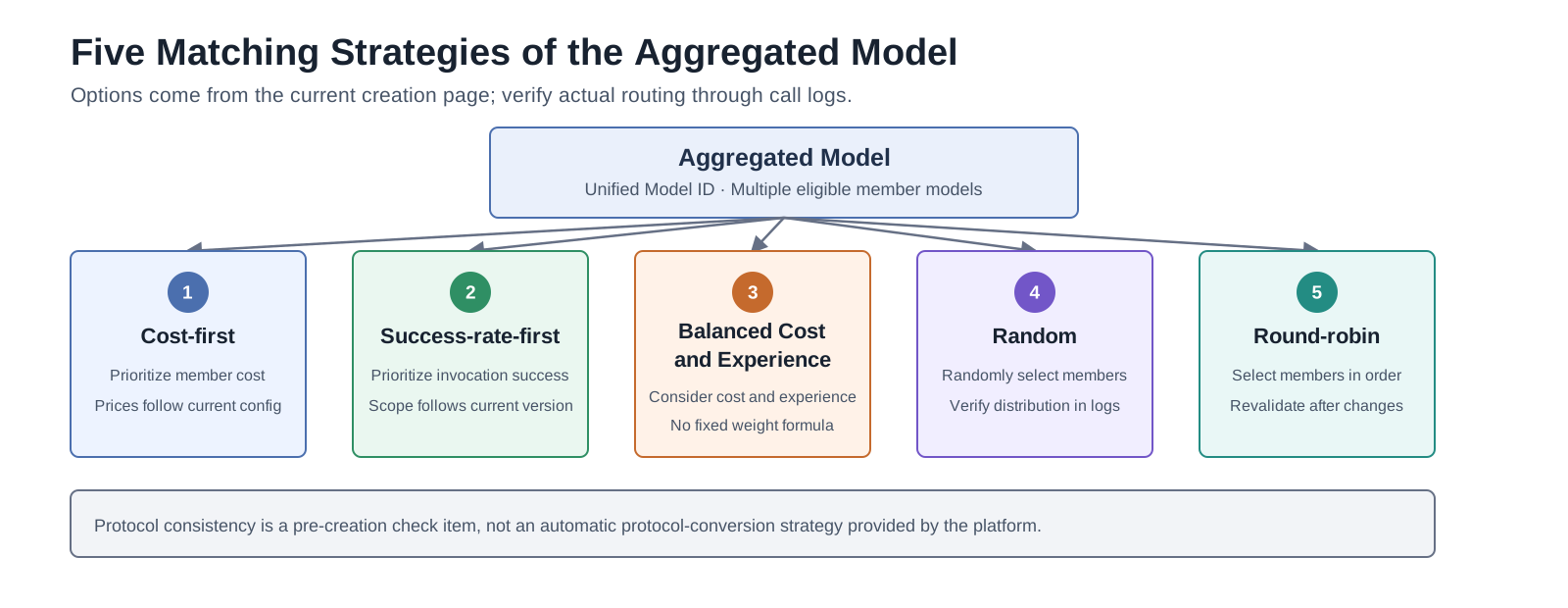
Figure 4 Five Matching Strategies of the Aggregated Model
The current creation page provides five matching strategies: cost-first, success-rate-first, balanced cost and experience, random, and round-robin. Protocol consistency is a pre-creation check item, not an automatic protocol-conversion strategy provided by the platform.
5.3 Five Aggregation Strategies in Detail
5.3.1 Cost-optimized Aggregation
- Purpose: Prioritize cost among available member models.
- Validation: Confirm prices and actual routing results against the current configuration and call logs.
5.3.2 Success-rate-first
- Purpose: Prioritize invocation success rate among available member models.
- Validation: Confirm the success-rate calculation scope and actual member-model selection results against the current version and call logs.
5.3.3 Balanced Cost and Experience
- Purpose: Consider both member-model cost and invocation experience.
- Validation: This document does not define a fixed weighting formula. Confirm actual results through call logs.
5.3.4 Random
- Purpose: Randomly select from eligible member models.
- Validation: Use multiple call logs to check member-model selection results. Do not state a fixed distribution ratio.
5.3.5 Round-robin
- Purpose: Select among eligible member models in round-robin order.
- Validation: After member changes, recheck call logs to confirm that the round-robin results match expectations.
5.4 Runtime Routing and Aggregation Governance
During a call, an aggregated model uses request requirements, candidate runtime state, and aggregation type to select members, retry eligible failures, and assign billing. These capabilities describe the current code behavior. Their availability depends on model metadata, aggregation type, environment configuration, and the deployed version.
| Runtime Capability | Current Behavior | Availability Boundary |
|---|---|---|
| Request-level capability-aware routing | For each call, the router filters member models by protocol, Function, Reasoning, Web Search, and context, input, and output token limits. | This filter compares request requirements and model capability metadata. It does not make Function Calling a deliverable feature. See the Support Matrix. |
| Runtime health and load awareness | The router uses minute-level success rate, circuit state, in-flight requests, and node count to adjust eligible candidates. | Actual selection depends on the available runtime data and the current matching strategy. |
| Automatic retry across model sources | For an eligible service, timeout, or platform error, the router retries before it returns output. It excludes the tried model and models from the same source. The default maximum is three attempts. | The router does not retry after it returns output or for an error that does not meet the retry conditions. |
| Adaptive route plans and experience feedback | The router records time to first token, output speed, success, and failure in the runtime state. It uses this data to update later route plans. | The route plan changes with actual call results and does not define a fixed member distribution. |
| Public candidate pool for default aggregation | A platform default aggregate can discover approved, listed, public models that map to the same meta model. | This behavior applies to platform default aggregates. A provider-created aggregate uses configured member models, and final access control still applies. |
| Layered billing and responsibility assignment | The platform uses the default, public, or private aggregation type to assign the balance, service publisher, and routed member model. | Actual charges and records depend on model prices, billing rules, and call data. |
5.5 Multi-scenario Aggregation Configurations
| Aggregation Scenario | Available Strategy | Configuration and Validation Focus |
|---|---|---|
| Cost-sensitive invocation | Cost-first | Check member prices and actual routing results |
| Success-priority invocation | Success-rate-first | Check success-rate calculation scope and exception handling results |
| Balanced cost and experience | Balanced cost and experience | Validate the combined selection result through call logs |
| Request distribution among members | Random or round-robin | Check member-selection distribution through multiple calls |
5.6 Member Adjustment and Validation for Aggregated Models
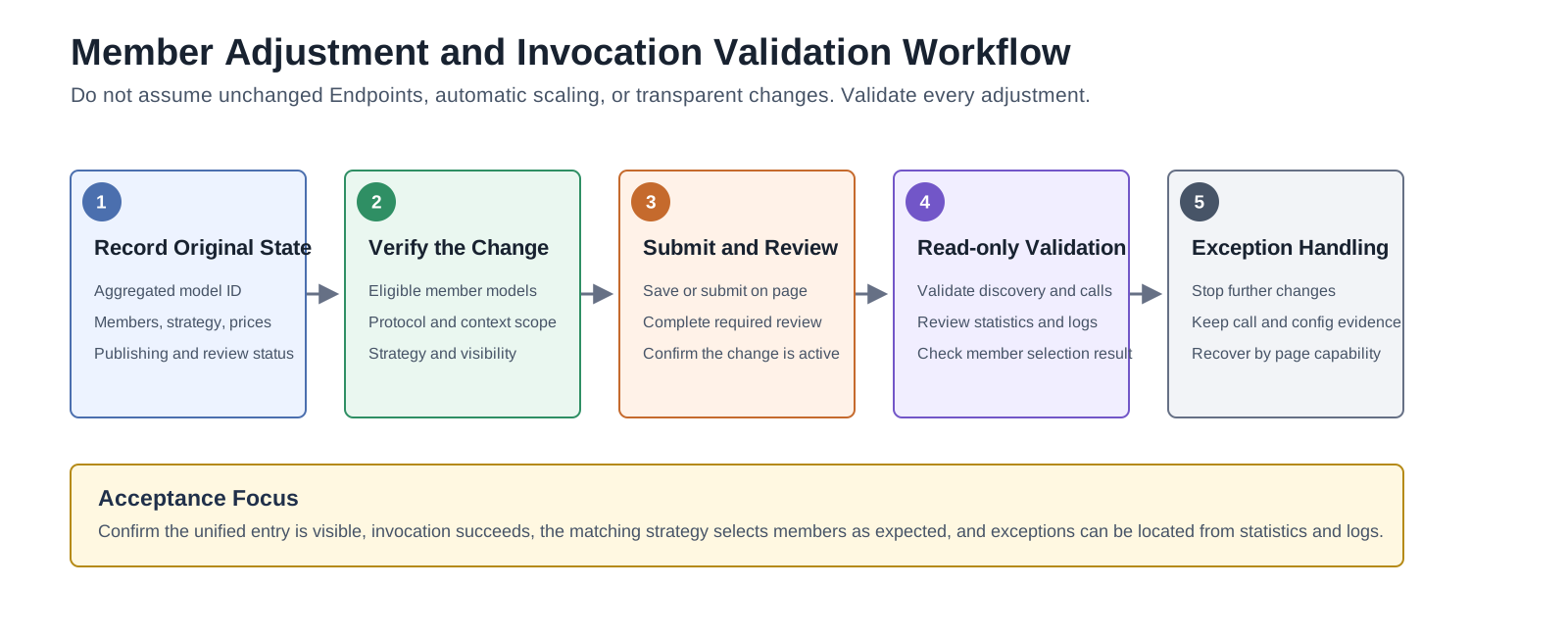
Figure 5 Member Adjustment and Invocation Continuity Validation Workflow for Aggregated Models
When member models or matching strategies change, first record the original configuration, then complete the adjustment and required review on the page, and validate the result through invocation, call statistics, and call logs. This document does not assume that the Endpoint remains unchanged, that automatic scaling is available, or that changes are transparent to the business.
6. Metering, Billing, and Financial Operations — Fine-grained Operational Control
6.1 Capability Overview
AGIOne provides operational pages for call logs, usage, metering details, credits, revenue, user billing, customer finance, finance operations, settlement, reconciliation, and License status so users can review data recorded in the current environment. Billing dimensions, precision, currency, credit rules, settlement methods, License quotas, and financial-account workflows depend on commercial configuration, model-returned fields, synchronization status, and the deployed version.
6.2 Multi-dimensional Metering Data Collection
The platform can record or aggregate the following metering dimensions. Availability, precision, and completeness depend on fields returned by the target model, metering configuration, and synchronization status:
| Metering Dimension | Captured Content | Data Boundary |
|---|---|---|
| Input token count | Input tokens returned by the model or recorded by the platform | Whether system prompts and conversation history are included depends on target-model returned fields and metering configuration |
| Output token count | Output tokens returned by the model or recorded by the platform | Data completeness in streaming interruption scenarios must be validated by target model |
| Call count | API call count and success or failure status | The statistical scope follows call logs and the current page |
| Inference duration | Page-recorded fields such as call duration and first-token latency | Time precision follows the current page, collection configuration, and deployed version |
| Multimodal metering | Images, audio, or other multimodal usage returned by the model | Availability and unit depend on model-returned fields |
6.3 Credit-based Pricing System
The platform can use quotas or credits to record resource and invocation consumption. The exact unit and conversion relationship are configured for the current environment:
- Unified records: Review consumption within the current account scope on usage and metering pages.
- Configuration relationship: Currency, prices, and credit relationships follow the current configuration maintained by operators.
- Role scope: Operators, model providers, and End Users see different data scopes.
- Result reconciliation: Cross-check invocation, usage, metering, and revenue data using the same time range.
Billing Rule Examples
The following values illustrate calculation methods only. They are not current model prices, conversion ratios, or settlement rules.
| Model Spec | Input Pricing | Output Pricing | Use Case |
|---|---|---|---|
| DeepSeek-V3 / 128K | 12 credits / 1K tokens | 48 credits / 1K tokens | High-value, complex reasoning |
| Qwen2.5-72B / 64K | 8 credits / 1K tokens | 32 credits / 1K tokens | Standard document processing |
| DeepSeek-7B / 32K | 2 credits / 1K tokens | 8 credits / 1K tokens | High-concurrency, lightweight workloads |
| Embedding models | 1 credit / 1K tokens | — | Knowledge base indexing and retrieval |
| OCR service | 5 credits / call | — | Image recognition |
💡 Credit ⇄ Currency Example
Assume a conversion ratio of
$1 = 100 credits:
- A single DeepSeek-V3 call with 1,000 input tokens + 500 output tokens = 12 + 24 = 36 credits = $0.36
- The Smart Manufacturing Division receives 10,000,000 credits at the start of the month (equivalent to $100,000), to be consumed freely throughout the month.
6.4 Metering Logs and Deduction Logs
The platform provides metering details, usage, call logs, revenue, and related record entry points for reconciliation. Actual fields, data scope, and synchronization timing depend on the current page.
6.4.1 Metering Log (per-invocation)
Captures the complete metering record of every individual API call:
| Field | Example |
|---|---|
| Call ID | req_2026042701000123 |
| Timestamp | 2026-04-27 10:23:45.123 |
| Tenant / User | Smart Manufacturing Division / zhangsan |
| Model / Endpoint | deepseek-v3-128k-aggregated |
| Input tokens | 1,243 |
| Output tokens | 587 |
| Inference duration (ms) | 8,234 |
| Result | Success |
| Credits charged | 1243 × 0.012 + 587 × 0.048 = 42.7 credits |
6.4.2 Deduction Log (per-account)
Aggregates credit deductions by tenant / user / period:
| Dimension | Example | Period | Opening Credits | Cumulative Deduction | Balance |
|---|---|---|---|---|---|
| Smart Manufacturing Division | (Department-level) | 2026-04 | 10,000,000 | 6,234,891 | 3,765,109 |
| Smart Manufacturing Division / Zhang San | (User-level) | 2026-04 | — | 432,156 | — |
| Smart Manufacturing Division / Example Application | (Application-level) | 2026-04 | — | 1,892,344 | — |
6.5 Finance and License Operations
The Billing module extends metering into finance-oriented workflows. It separates user-side billing views, provider revenue views, customer finance, operation finance, reconciliation, settlement, and License management.
| Area | Typical Scope | Manual Entry |
|---|---|---|
| User billing | Balance, quota, transactions, top-up orders, and monthly bills visible to the current account | Billing Overview |
| Provider earnings | Customer list, revenue, and settlement records in the permitted provider scope | Earnings |
| Customer finance | Customer profiles, business units, top-up orders, and customer financial state | Customer Billing |
| Finance operations | Today's tasks, monthly overview, settlement list, financial accounts, reconciliation, and adjustments | Finance Operations |
| License | License quota, validity, activation state, and module authorization | License |
Financial conclusions should be made from the concrete Billing pages with the same billing cycle, tenant, customer, account, and synchronization status. Do not infer settlement results from model-call metering alone.
7. Invocation Observability — End-to-End Monitoring and Analysis
7.1 Capability Overview
Invocation observability connects business calls and resource status through invocation overview, analytics, logs, and On-Prem monitoring pages. The correlatable path and available metrics depend on role permissions, collection configuration, fields returned by the target model, and the deployed version.
7.2 Three-Tier Monitoring Metric Framework
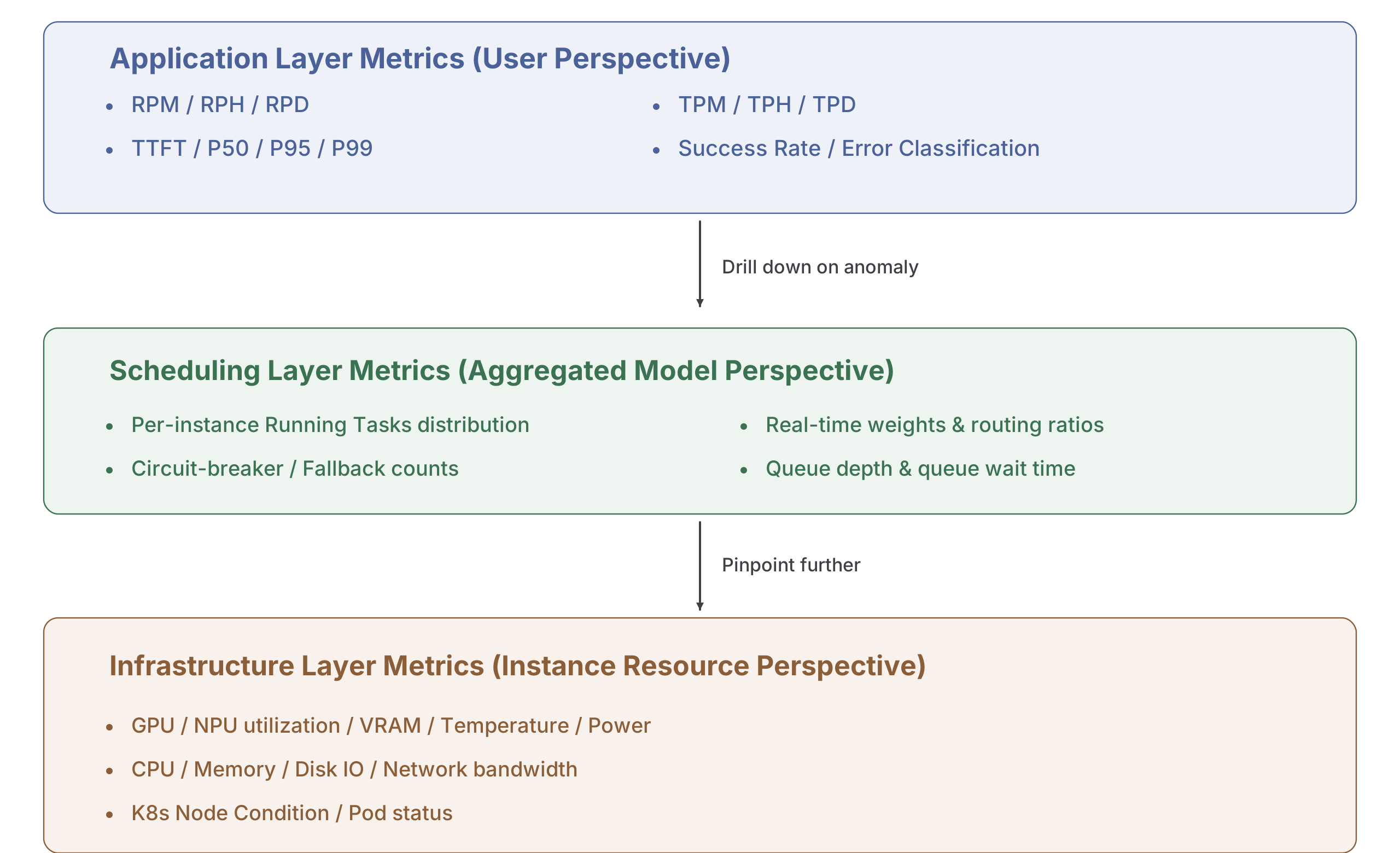
Figure 6 Three-Tier Monitoring Metric Framework for Invocation Observability
7.3 Multi-dimensional Invocation Analytics
7.3.1 By Model
- Invocation volume trends per model / aggregated model (hourly / daily / weekly).
- Average TTFT, P95 latency, token-per-second throughput per model.
- Error rate distribution and Top-N error types per model.
- Cost efficiency per model (credits per token, cost per instance).
7.3.2 By Customer / Tenant
- Invocation volume, token consumption, and credit deduction per tenant / API key.
- Rate-limit trigger count and over-limit request distribution per tenant.
- Usage heatmap by time of day per tenant (informing capacity planning).
- Top invoked endpoints and top users per tenant.
7.3.3 By Time Period
- Identification of business peak patterns (intra-week, intra-month, seasonal).
- Capacity forecasting: extrapolating RPM / TPM over the next 30 days from historical trends.
7.4 Coordinated Anomaly Diagnostic Workflow
When users report invocation issues, troubleshoot in the order application call → model and review status → Endpoint and quota → deployment and resource monitoring:
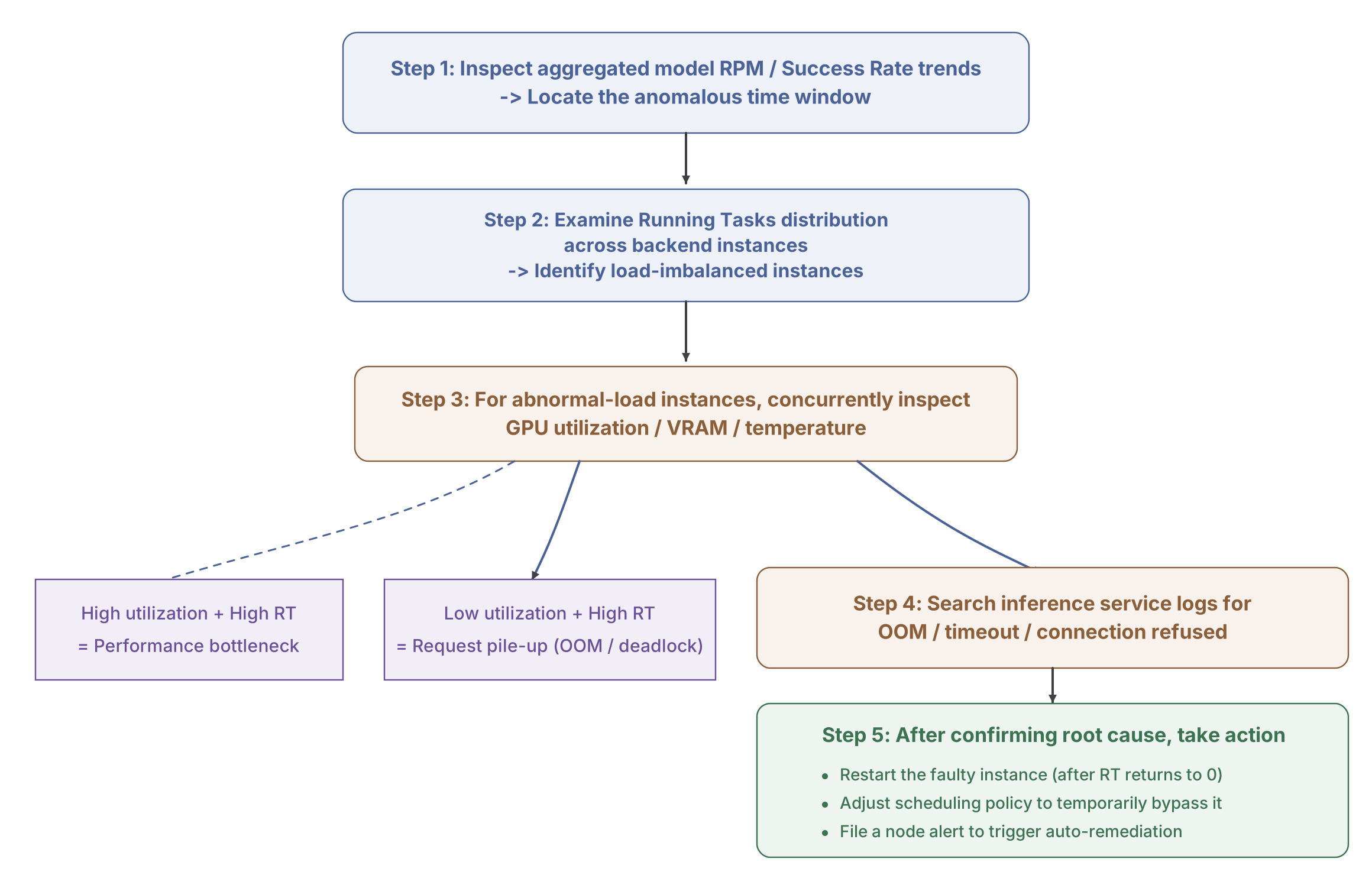
Figure 7 Coordinated Anomaly Diagnostic Workflow
8. Settings and Access Control — Platform Governance Workspace
8.1 Capability Overview
Settings centralizes identity, tenant, audit, login security, platform configuration, and API rate-control operations. It is used to maintain the control plane around the model and compute workflows rather than to publish or call models directly.
| Area | Typical Scope | Manual Entry |
|---|---|---|
| Personal settings | Keys, profile, projects, and personal dashboard | My Keys |
| Members and roles | Team members, roles, member quotas, and quota requests | Team Members |
| Tenants | Tenant records and user-side tenant settings | Tenants |
| Activity and audit | Operation logs and change traceability | Operation Logs |
| System settings | Platform settings and login properties | Platform Settings |
| API rate control | Rule management, observability audit, node cache, and publish center | API Rate Control Overview |
Settings changes can affect real users, access credentials, login behavior, audit visibility, and API traffic. Confirm role scope, tenant scope, and rollback method before changing members, roles, login policies, Keys, or rate-control rules.
9. Closed-loop Synergy Across Capabilities
AGIOne's first six business-stage capabilities can be used together in the sequence of resource preparation, model configuration, deployment, publishing, invocation, and operations:
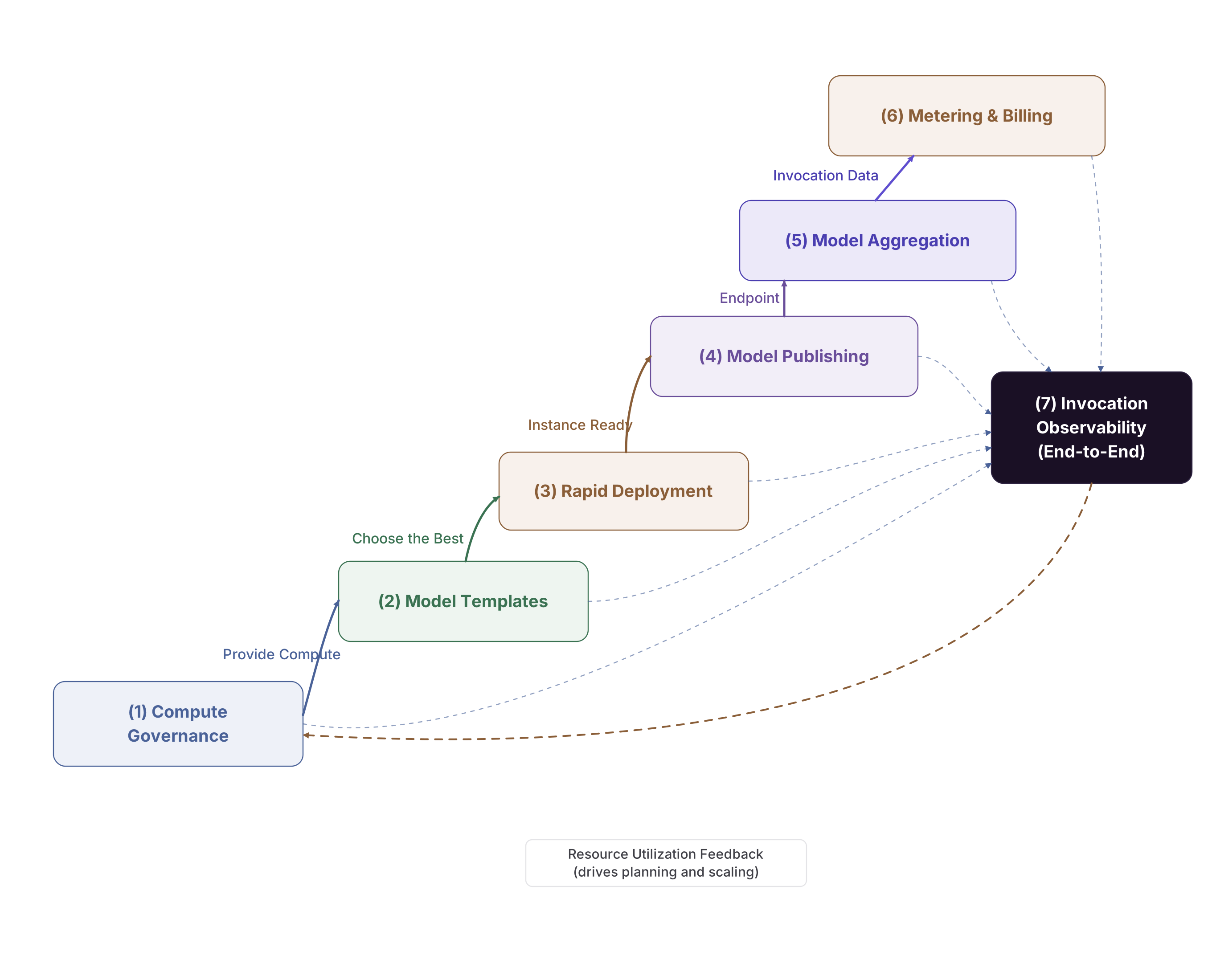
Figure 8 Closed-loop Synergy Across AGIOne's First Six Business-stage Capabilities
A representative business loop:
- ① Compute Management provides the resource foundation →
- ② Model Templates codify deployment expertise →
- ③ Rapid Deployment brings models online →
- ④ Model Publishing turns them into commercial services →
- ⑤ Model Aggregation optimizes user experience →
- ⑥ Metering and Billing drives financial accounting →
- ⑦ Invocation Observability feeds back into resource planning and template refinement → returning to ①