Access Overview
Feature Overview
| Item | Content |
|---|---|
| Applicable Roles | Operators |
| Navigation Path | AI Infra(On-Cloud) > Access Workbench > Access Overview |
| Page Route | /infrahub/op/workbanch/overview |
| Managed Objects | Access foundation, operational resource checklist, and authorization status |
Beginner Explanation
Access Overview is a dashboard for cloud access readiness. It combines platforms, pools, accounts, deployment assets, and both authorization types so that missing prerequisites are visible.
Terminology
| Term | Description |
|---|---|
| Access Foundation | A summary of connected cloud platforms, resource pools, and accounts. |
| Operational Resource Checklist | Readiness of runtime images, frameworks, models, and policies. |
| Authorization Status | A summary of tenant-cloud and business-region authorization. |
Recommended Operation Order
Review Access Foundation, then the operational resource checklist, and finally both authorization areas. Open the responsible object page for each missing item.
Beginner Checklist
| Scenario | Do First | Do Not Do Directly |
|---|---|---|
| First visit | Review existing objects, states, and available actions | Change an unknown object |
| Before a change | Verify upstream dependencies, impact scope, and target object | Skip dependency and impact checks |
| After completion | Validate the current and downstream pages with Result Validation | Rely only on a success message |
| Page error | Record the redacted object, time, and page message | Submit repeatedly or record real credentials |
Prerequisites
- The current account has the permission required for Access Overview.
- The current account can view Access Overview and its linked detail pages.
- Use the overview to assess status. Make changes on the responsible object page and return to validate.
Page Description
The upper area shows the access foundation, the middle area shows operational resources, and the lower area shows authorization status and management entries.
Page screenshots:
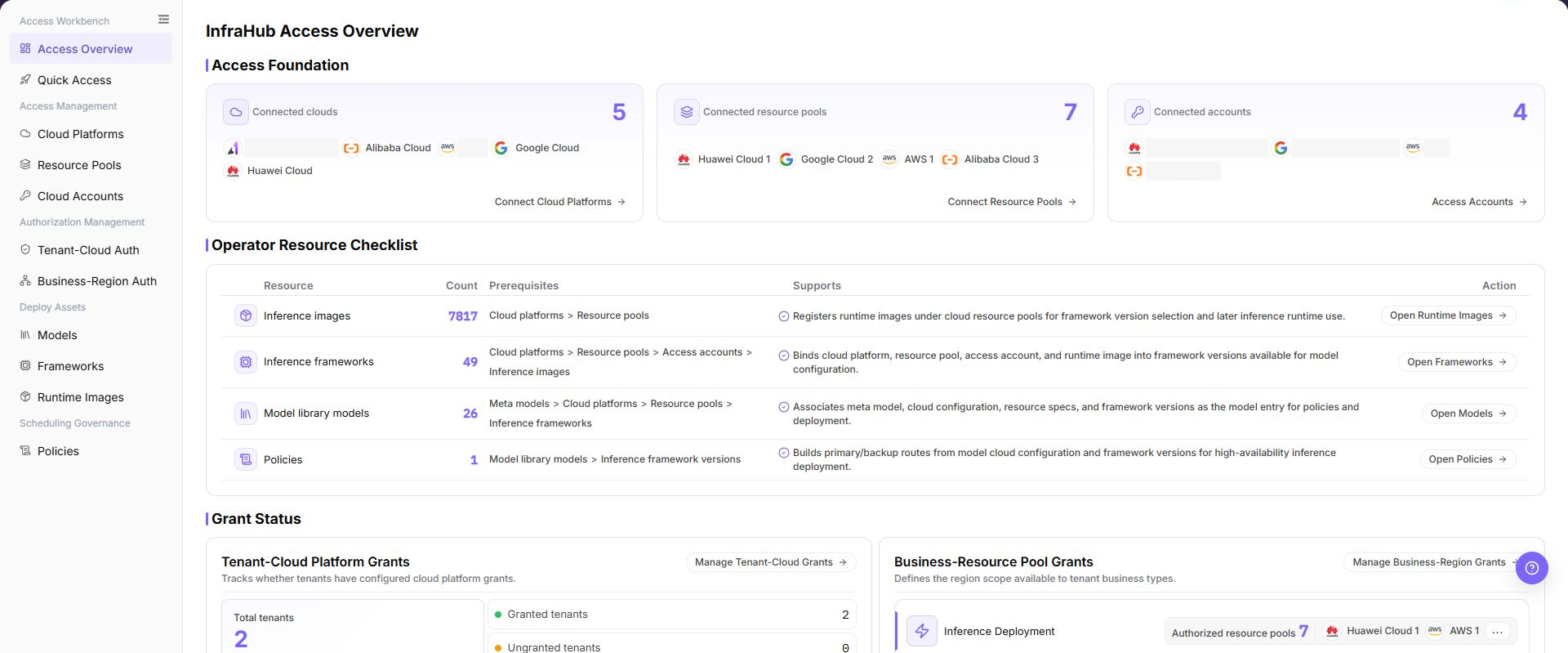
The image shows Access Overview page. Verify the target object, current state, fields, and actions.
Main Operations
View Access Overview
- Go to
AI Infra(On-Cloud) > Access Workbench > Access Overview. - Verify connected platform, pool, and account counts.
- Verify runtime-image, framework, model, and policy counts and prerequisites.
- Verify tenant and business authorization status.
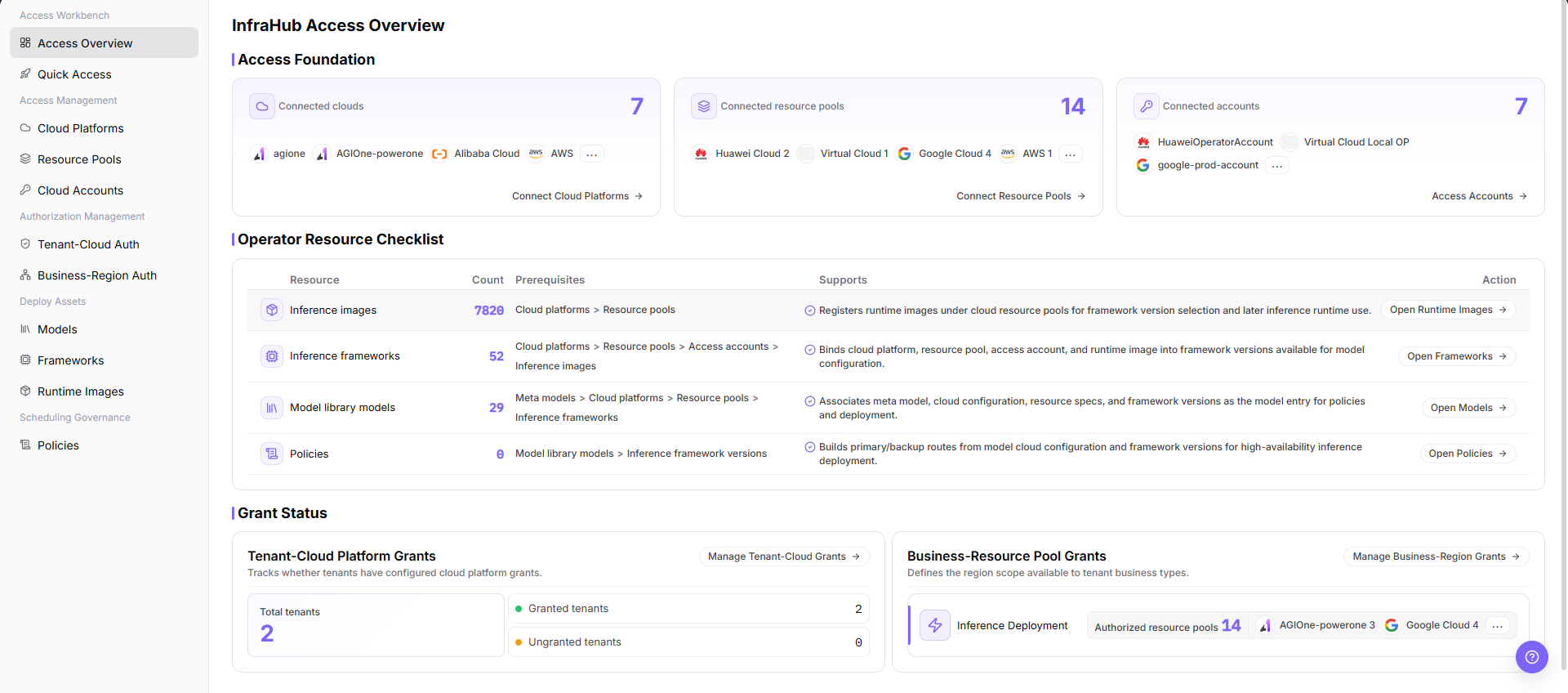
The image shows Access Overview details. Verify the target object, current state, fields, and actions.
Open Resource Management Pages
- Locate the target item in the operational resource checklist.
- Click "Open" on the row.
- After processing, return to Access Overview and refresh.
Open Authorization Management Pages
- Locate the tenant or business authorization area.
- Click "Manage Authorization" to open the responsible page.
- After authorization, return and confirm that counts and status are synchronized.
Parameter Reference
| Field Name | Required | Field Type | Example | Description |
|---|---|---|---|---|
| Connected clouds | System-generated | Number / list | Displayed on page | Shows the number and names of connected cloud platforms. |
| Connected resource pools | System-generated | Number / list | Displayed on page | Shows the number and names of connected resource pools. |
| Connected accounts | System-generated | Number / list | Displayed on page | Shows the number and names of connected accounts. |
| Resource | System-generated | Text | Inference images | Resource type in the operator resource checklist. |
| Count | System-generated | Number | Displayed on page | Number of registered or configured items under the resource type. |
| Prerequisites | System-generated | Text | Displayed on page | Access configurations that must be completed before the resource can be used. |
| Supports | System-generated | Text | Displayed on page | Describes the role of the resource in the inference deployment or scheduling flow. |
| Action | No | Action entry | Open | Jumps to the corresponding resource management page. |
| Total tenants | System-generated | Number | Displayed on page | Number of tenants in the current statistics scope. |
| Granted tenants | System-generated | Number | Displayed on page | Number of tenants with cloud platform grants configured. |
| Ungranted tenants | System-generated | Number | Displayed on page | Number of tenants without cloud platform grants configured. |
| Authorized resource pools | System-generated | Number / tag | Displayed on page | Number and names of resource pools available to the business type. |
Pitfalls
- Do not skip the upstream dependency check: The current account can view Access Overview and its linked detail pages.
- Confirm impact before a configuration change: Use the overview to assess status. Make changes on the responsible object page and return to validate.
- A success message does not prove downstream synchronization. Use Result Validation afterward.
- Use only
<API_KEY>,<PERSONAL_KEY>,<ACCESS_KEY_ID>,<ACCESS_KEY_SECRET>,<BASE_URL>, and<ENDPOINT_PATH>for credential and endpoint examples.
Result Validation
| Check Item | Success Signal | If Abnormal |
|---|---|---|
| Page is accessible | Title, navigation, and main content display correctly | Check role permission and navigation path |
| Managed objects are visible | Access foundation, operational resource checklist, and authorization status display as expected | Clear filters and verify upstream dependencies |
| Operation result is saved | The expected state or new record appears | Review page messages, required fields, and dependencies |
| Downstream result is consistent | Associated pages show the change | Wait for synchronization, refresh, and return to the responsible object |
FAQ
Target Object Is Missing in Access Overview
Symptom:
The expected object is missing from the list or selector.
Possible Causes:
- Active query criteria filter out the target object.
- An upstream object is disabled, or the current role lacks visibility.
Resolution:
- Clear filters and refresh the page.
- Verify the prerequisite object: The current account can view Access Overview and its linked detail pages.
- Confirm the current role and data scope, then locate the object again.
Access Overview Action Is Unavailable
Symptom:
An expected button, menu, or state switch is unavailable.
Possible Causes:
- The current account lacks the required action permission.
- Object state, references, or prerequisites block the action.
Resolution:
- Verify the permission for the action and the current object state.
- Check references and prerequisites identified by the page message.
- Remove the blocker, refresh the page, and perform the action once.
Access Overview Change Does Not Reach Downstream
Symptom:
The page reports success, but a downstream page still shows the old state.
Possible Causes:
- An associated page has stale cache or synchronization delay.
- The current and downstream pages use different roles, tenants, or data scopes.
Resolution:
- Wait for synchronization and refresh both pages.
- Confirm that both pages use the same role, tenant, and object scope.
- If they still differ, return to the responsible object and verify the saved result.
Access Overview Data Differs from Another Page
Symptom:
Counts or states differ from an associated page.
Possible Causes:
- The pages use different filters, aggregation rules, or update times.
- The change is still synchronizing, or role-based data scopes differ.
Resolution:
- Align filters and aggregation rules on both pages.
- Check update times and wait for synchronization.
- Compare object details instead of summary counts only.
How to Troubleshoot a Access Overview Failure
Symptom:
Submission fails or the state does not change for an extended period.
Possible Causes:
- Required fields, field combinations, or object state do not meet submission rules.
- An upstream dependency is invalid, the request failed, or the same action is already processing.
Resolution:
- Record the redacted object, time, and complete page message.
- Verify required fields, object state, and upstream dependencies.
- Confirm that no identical job is processing before one retry.
Notes
- Use the overview to assess status. Make changes on the responsible object page and return to validate.
- Do not put real accounts, credentials, internal locations, or customer data in documentation, screenshots, tickets, or chat records.
- Authorization, deployment, deletion, publication, state, or billing changes require an auditable record and recovery plan.
Next Steps
- Go to the cloud platform, resource pool, or access account page to complete access configuration.
- Go to inference images, inference frameworks, model library models, or policies to view operator resource readiness.
- Go to grant management pages to check tenant and business resource pool grants.