Model Usage
Feature Overview
| Item | Content |
|---|---|
| Applicable Roles | Model Provider, Model Consumer |
| Navigation Path | Model Services > Usage and Earnings > Model Usage |
| Page Routes | Overview: /modelone/accounting/deduction/overview/modelUsage Details: /modelone/accounting/deduction/detail/model |
| Managed Objects | Usage overview, Model ID, attribution, consumption trends, model distribution, and usage details |
Beginner Explanation
Model Usage works like a usage ledger for model activity. Use the overview for totals and trends, and use details to reconcile records by time, model, Model ID, and attribution scope.
Terminology
| Term | Description |
|---|---|
| Overview | Summarizes usage indicators and trends for the selected time range. |
| Usage Details | Shows individual usage records by time and business object. |
| Model ID | The platform model identifier associated with the usage record. |
| Attribution | The member, project, and Key scope to which the usage record is attributed. |
| Statistics Period | Determines the time range and aggregation scope for overview and details. |
| Model Distribution | Shows each model's share of total usage. |
Recommended Operation Order
Review totals, trends, and model distribution in Overview, and then query records in Usage Details. Use the same statistics period in both tabs during reconciliation.
Beginner Checklist
| Scenario | Do First | Do Not Do Directly |
|---|---|---|
| No data | Expand the statistics period first | Conclude that there is no usage |
| Overview and details differ | Align time range and filters | Mix different scopes |
| Preparing reconciliation | Record the period and filters | Keep screenshot values only |
| Sharing data | Redact users and business identifiers first | Share raw details externally |
Prerequisites
- The current account has access to the
Model Usagepage. - The target model has call records in the statistical period.
- The billing cycle, date range, billed usage status, model name, or model type to view has been confirmed.
- Consumption amount, model call records, request content, and request IDs are sensitive information and must be redacted before screenshots or export.
High-Risk Operation Boundary
Use this page to view and reconcile usage overview and details. Charging, account adjustment, settlement, and sensitive-data export are not performed here. Redact accounts, requests, amounts, credentials, and business identifiers before sharing data.
Page Description
The page contains Overview and Usage Details. The overview shows aggregate indicators and trends. Usage Details provides a queryable record list with Model ID and Attribution columns. The current Demo does not expose member or project attribution filters, so use the visible billing-status, model-name, and model-type filters only.
Page screenshots:
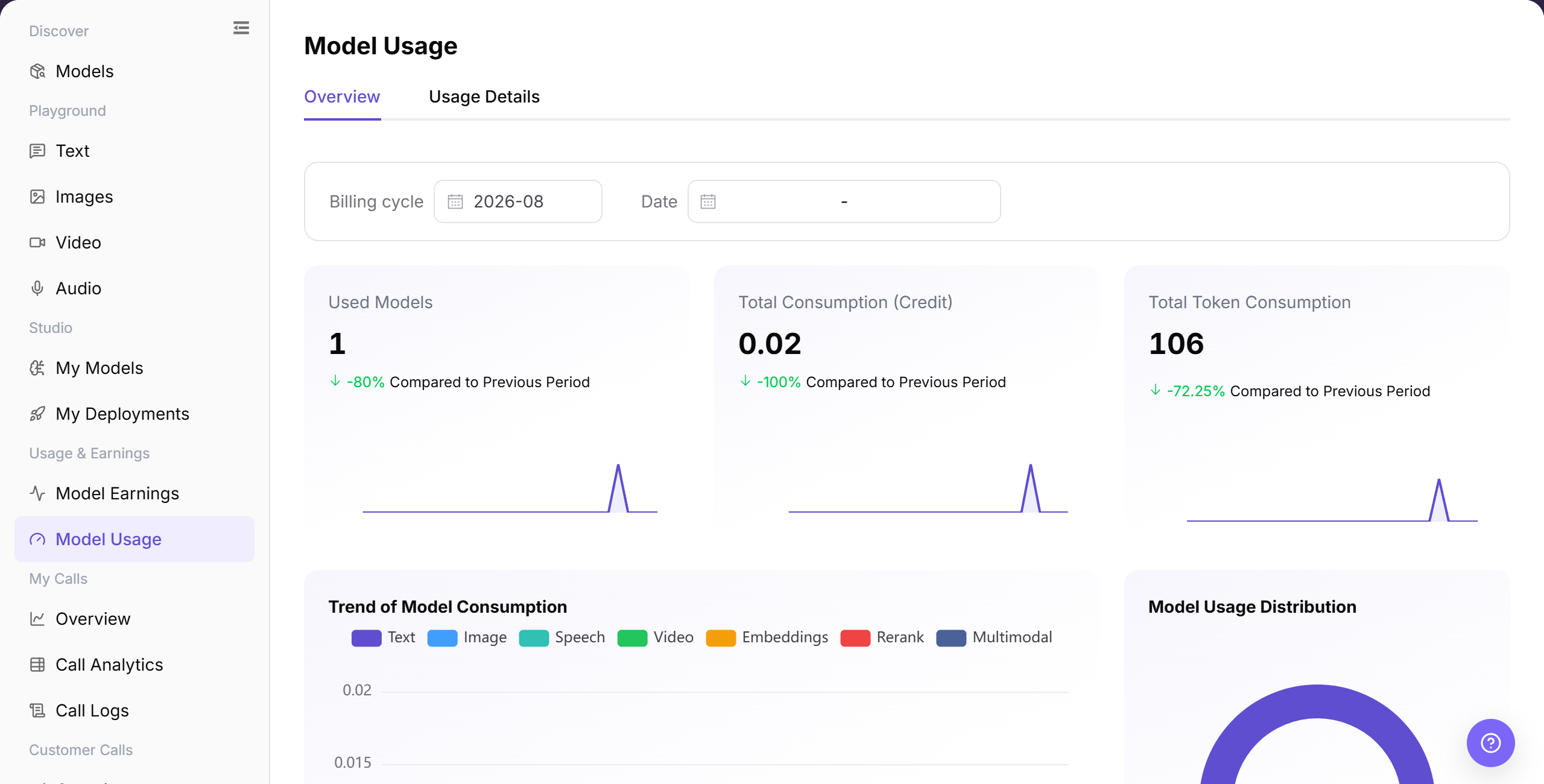
The "Overview" tab displays total credits consumed, total invocation count, and model usage distribution charts for the selected period.
Main Operations
View Model Usage Overview
- Go to
Model Services > Usage and Earnings > Model Usage, which defaults to theOverviewtab. - Select an accounting month and specify the date range to review total credit consumption, invocation counts, and average cost per call.
- Inspect the consumption trend charts and model breakdown percentages to analyze which models contribute most to overall usage.
- If no data appears, adjust the time period or verify whether the current account initiated any model calls during this interval.
Query Model Usage Details
- Click the "Usage Details" tab at the top of the page.
- Set the date range and filter by billing inclusion status, model name, or model type as needed.
- Click "Search" to review the invocation timestamp, model name, Model ID, Attribution, latency, metered tokens, and deducted Credits.
- Redact organization identifiers and sensitive business parameters before sharing logs or exporting records for reconciliation.
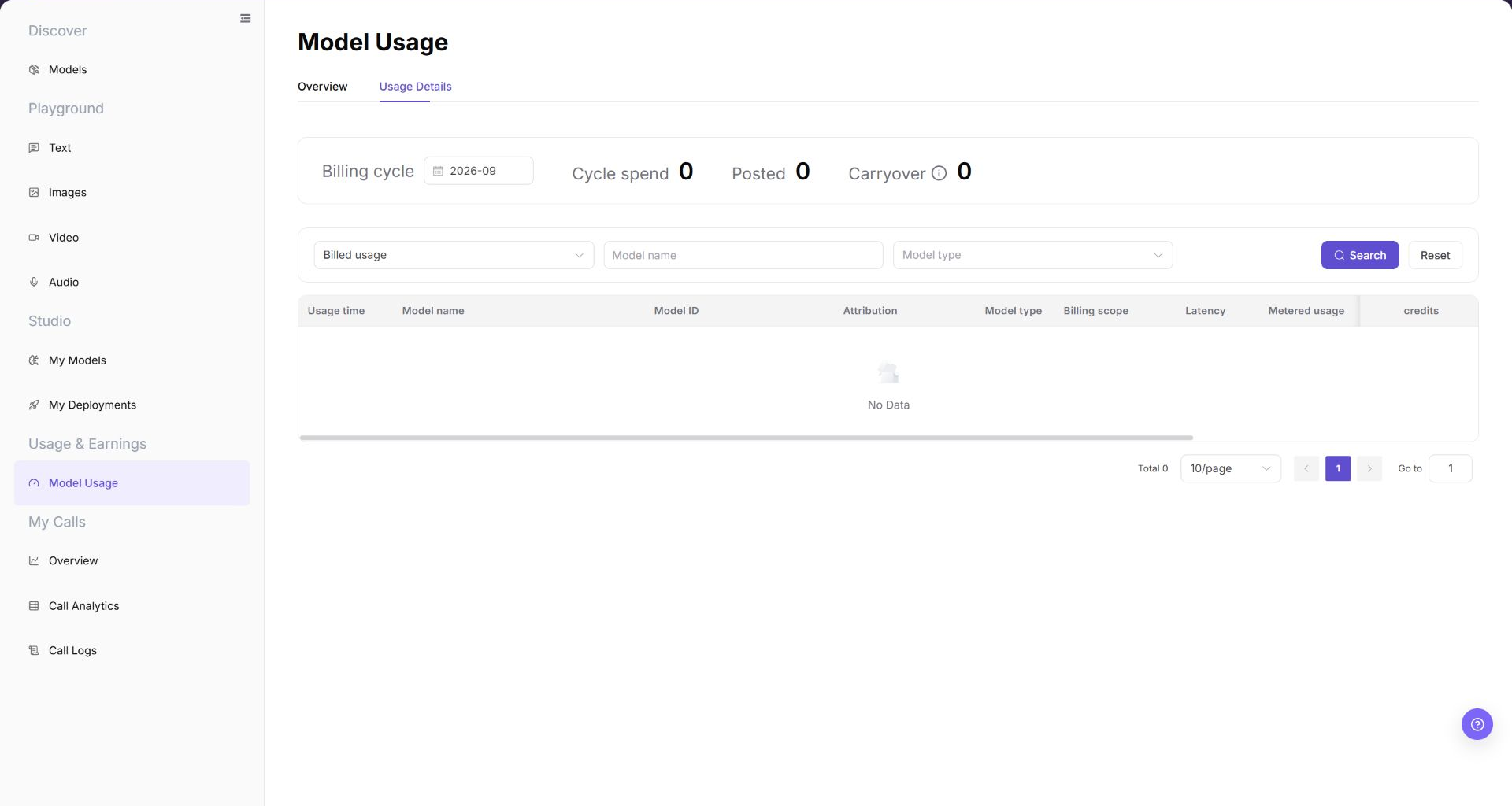
The "Usage Details" list displays the call time, model identifier, attribution, latency, and credit consumption for each invocation.
Parameter Reference
| Field Name | Required | Field Type | Example | Description |
|---|---|---|---|---|
| Billing cycle | Yes | Month selector | 2026-07 | Month that the usage statistics and posting belong to. |
| Date | No | Date range | 2026-07-01 to 2026-07-17 | Limits the statistical time range for overview charts. |
| Billed usage | No | Dropdown | Billed usage | Filters usage details by whether the record is billed. |
| Model Name | No | Input | Example Model | Filters usage records by model. |
| Model Type | No | Dropdown | Text | Filters usage details by model capability type. |
| Model ID | System-generated | Text | <MODEL_ID> | Shows the platform model identifier associated with the usage record. |
| Attribution | System-generated | Text | Member / Project / Key scope | Shows the ownership scope to which the usage record is attributed. |
| Input Usage | System-generated | Number | Input Tokens | Request input tokens or input-side usage. |
| Output Usage | System-generated | Number | Output Tokens | Model output tokens or output-side usage. |
| Cache Usage | System-generated | Number | Cached Input Tokens | Cached input hits or cache-related usage. |
| Web Search Usage | System-generated | Number | 12 | Consumption generated by Web Search tools or related capabilities. |
| Cost | System-generated | Number | Credits | Credit consumption generated by the call. |
| Status | System-generated | Tag | Billed usage | Billing or posting status of the usage record. |
| Actions | No | Row entry | View | View usage records, pricing rules, or related billing information. |
Pitfalls
- Model Usage is for consumption reconciliation. It does not directly equal final revenue, which also depends on billing rules and settlement scope.
- Align model, customer, time range, and call type before comparing usage.
- Recent calls may not appear immediately because of statistical delay. Check call logs at the same time.
Result Validation
| Check Item | Success Signal | If Abnormal |
|---|---|---|
| Page is accessible | The Model Usage page opens, and Overview and Usage Details tabs are visible. | Check account permissions, navigation path, and page loading status. |
| Usage overview displays | Used Models, Total Consumption, Total Token Consumption, and charts are visible. | Switch Billing cycle or Date and retry. Confirm whether the current period has usage data. |
| Filter controls can be selected | Billing cycle, Date, Billed usage, Model name, and Model type can be entered or selected. | Check filter format, or click "Reset" and query again. |
| List data loads | The usage details list shows Usage time, Model name, Model ID, Attribution, Model type, Billing scope, Latency, Metered usage, and Credits. | Confirm whether the billing cycle contains usage records, or broaden filters. |
| Details entry opens | Pricing rules, detail, or view entries display related information. | Check whether the record is complete, or refresh the page and retry. |
| Fields match filters | Model ID, Attribution, usage, cost, status, and time fields match the filter conditions and related call logs. | Compare call logs and model earnings to confirm statistical delay or billing-rule differences. |
FAQ
Model Usage Data Is Empty
Symptom:
No usage data appears for the selected period.
Possible Causes:
- No relevant record exists in the period.
- The filters are too narrow.
Resolution:
- Click "Reset" to clear the filters.
- Select a billing cycle and date range that contain a known call.
- Check "My Calls > Call Logs" with the same range. Contact the administrator if the log exists but Model Usage remains empty.
Overview and Details Differ
Symptom:
The overview total differs from the sum of details.
Possible Causes:
- The tabs use different time ranges.
- Detail filters are still active.
Resolution:
- Align the statistics period.
- Reset detail filters and calculate again.
- If the totals still differ, send the billing cycle, date range, and Model ID to the administrator.
Target Model Has No Record
Symptom:
No usage record appears for the target model.
Possible Causes:
- Model name or time criteria do not match.
- The current account does not include the record in its visible model scope.
Resolution:
- Query the model and expand the period.
- Check the same Model ID in "My Calls > Call Logs".
- If the log exists but Model Usage has no record, send a redacted request ID to the administrator.
Data Update Time Is Abnormal
Symptom:
A recent call appears in Call Logs but has no related Model Usage record.
Possible Causes:
- Model Usage and Call Logs use different billing cycles or date ranges.
- The target call uses a different model or account.
Resolution:
- Use the same billing cycle, date range, and Model ID.
- Record the redacted request ID from Call Logs.
- If Model Usage still has no record, send the filters and request ID to the administrator.
Reconciliation Has a Difference
Symptom:
Page usage differs from an external record.
Possible Causes:
- Billing units or time boundaries differ.
- Model or customer scopes differ.
Resolution:
- Fix time, model, and billing unit.
- Reconcile record by record from details.
- If the difference remains, send the redacted details and reconciliation rules to the billing administrator.
Notes
- Do not write real accounts, request content, amounts, secrets, request IDs, or internal test parameters in the document.
- Before screenshots or export, confirm that model names, business identifiers, Credits, and billing details are redacted.
- Exporting sensitive data, charging, account adjustment, and settlement are outside the scope of this document.
Next Steps
- Cross-check with model earnings, call analytics, and call logs.
- Use redacted usage details for reconciliation.
- Adjust rate limits, pricing, or model operations strategy based on consumption trends, model usage distribution, and call frequency distribution.